
More detailed information about the function can be found on the Fabulatech partner site: http://www.usb-over-network.com/partners/igel/.
Dependencies
To use the FabulaTech Scanner redirection, the following apps must be installed and configured as well:
-
FabulaTech Plugins. For configuration details, see Getting Started with FabulaTech Plugins on IGEL OS.
How to Disable or Enable the Scanner Redirection
-
In the profile configurator, go to Apps > FabulaTech Scanner for Remote Desktop > Settings.
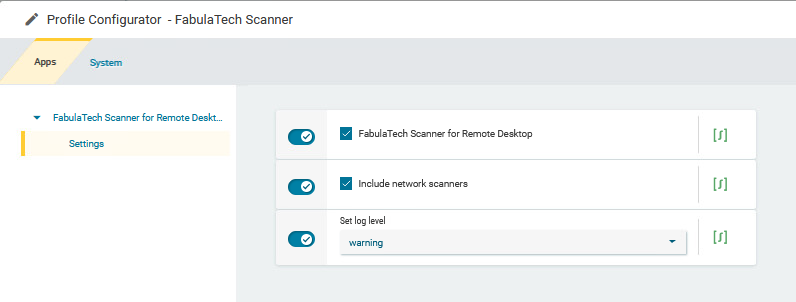
-
Change the settings as required.
FabulaTech Scanner for Remote Desktop
- Fabulatech Scanner redirection is enabled for the sessions that are enabled in the FabulaTech Plugins app. (Default)
- Fabulatech Scanner redirection is disabled.
Include network scanners
- Scanners that are made available to the device through the network are also redirected. (Default)
- Network scanners are not redirected.
Set log level
Defines the degree of detail written into the log file.
Possible options:
-
Debug
-
Info
-
Warning (Default)
-
Error
-
None