Skip to main content
AI Disclaimer
11.11.100
11.10.430
11.10.410
11.10.270
11.10.250
11.10.210
11.10.190
11.10.150
11.10.120
11.10
Main navigation
Close navigation
11.11.100
11.10.430
11.10.410
11.10.270
11.10.250
11.10.210
11.10.190
11.10.150
11.10.120
11.10
English
German
English
German
Main
AI Disclaimer
Main
Partner Solutions
IGEL OS Articles
Overview: First Steps with IGEL OS 11
Update and Upgrade
BIOS Tools
Citrix
RDP
VMware Horizon
Evidian
IBM iAccess
Imprivata
Microsoft Azure Virtual Desktop (AVD)
SSH
Using Amazon WorkSpaces via the HP Anyware PCoIP Client
Login Enterprise Configuration
Nutanix
Browser
System
Network
Security
Certificates
Smartcard
Desktop and Display
Customizing
Devices
Monitor
Using a Cherry SECURE BOARD
Webcam Redirection and Optimization in IGEL OS
Webcam Information
Bluetooth Tool
How to Deploy a Jabra Xpress Package
Connecting Signature Pads
Using a Kofax / Wacom Signature Pad
Using a StepOver Signature Pad
eGK/KVK - Card Reader
Using Mobile Device Access
Enabling Mobile Device Access
Disabling Mobile Device Access
Mapping a Mobile Device for a Session
Connecting Your Mobile Device
Accessing the Mobile Device USB Window from a Session
Viewing the Files and Directories Locally
Safely Removing the Mobile Device
Swapping Function of Mouse Buttons (e.g. When Using an Evoluent Mouse)
Using Natural Scrolling (Reverse Scrolling Direction) on IGEL OS Devices
Connecting a Serial Barcode Scanner
Using DriveLock with IGEL Devices
Restricting the Mounting of Hotplug Storage Devices on IGEL Linux
When to Use USB Redirection
How to Configure USB Access Control
Issues with USB IDs in USB Devices Rules
How Can I Fix Touchpad Issues?
How Do I Configure a Fujitsu PalmSecure Vein Scanner with IGEL OS?
Virtual Background for Unified Communication Apps in IGEL OS
Printer
UD Pocket
Miscellaneous
IGEL OS Reference Manual
IGEL UD Pocket Manual
IGEL OS Creator
IGEL OS Creator for Windows (OSCW)
IGEL OS Release Notes
Breadcrumbs
Home
IGEL OS
IGEL OS Articles
Devices
Using Mobile Device Access
On this Page
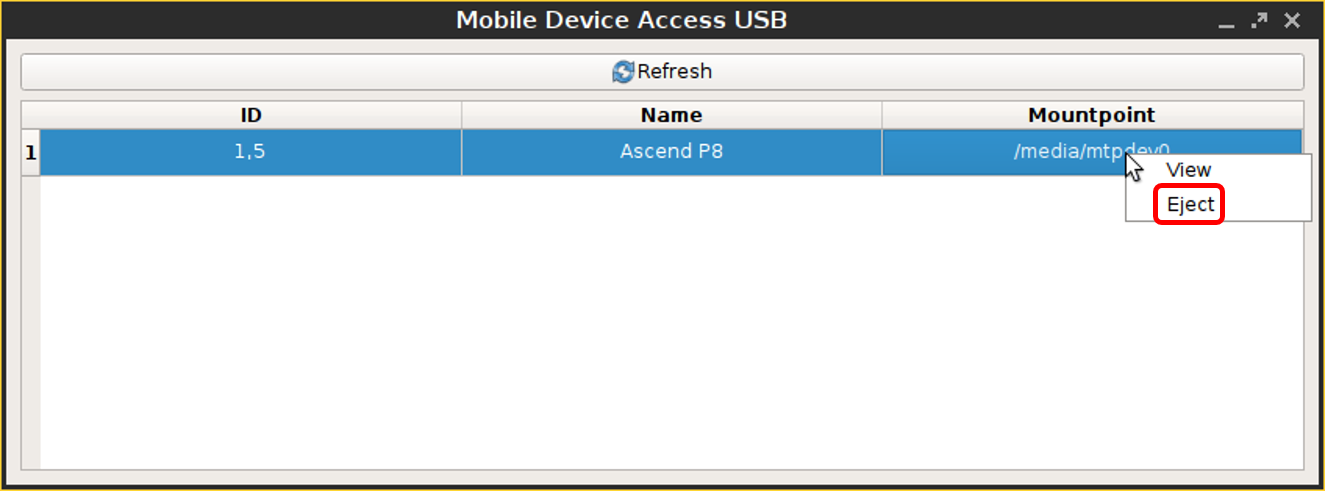
Safely Removing the Mobile Device
->Click
Eject
in the context menu for the device in question.