
Symptom
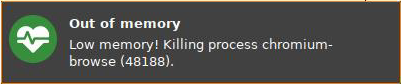
A local application or session is killed, and a message that reads Low memory! Killing process [...] is shown.
Example:
Environment
-
IGEL OS 11.04 or higher
Problem
The system is running out of memory. As a countermeasure, the system has terminated the application.
Solution
->Close other applications that are not needed and restart the application.
->If the terminated application is Chromium or Firefox, restart it and try using fewer open tabs.
->If the issue occurs often, consider extending the memory size of the devices.