
Enabling Fabulatech Scanner Redirection
-
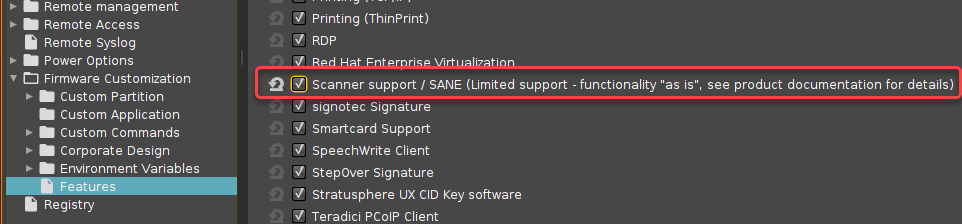
In the IGEL Setup, go to System > Firmware Customization > Features and make sure that Scanner support /SANE (Limited support - functionality "as is", see product documentation for details) is activated.
-
If the option is already activated, continue with step 2.
-
If the option has not been activated before, the software component must be downloaded first. For this purpose, make sure that the source of the current firmware is set correctly:
-
If you are using Universal Firmware Update, make sure that the device is assigned to the current firmware. For details, see Universal Firmware Update and Assigning updates.
-
If you are not using Universal Firmware Update, make sure that System > Update > Firmware Update is set to the source of the current firmware. For details, see Firmware Update Settings for IGEL OS.
-
-
After clicking OK to confirm your changes, you must reboot the system.
-
-
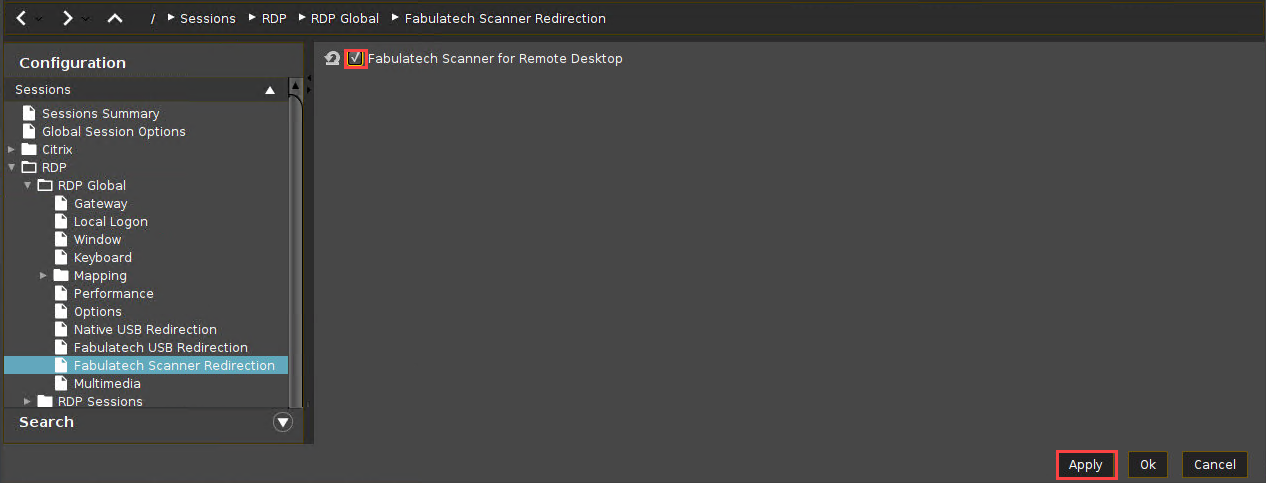
In the IGEL Setup, go to Sessions > RDP > RDP Global > Fabulatech Scanner Redirection.
-
Check Fabulatech Scanner for Remote Desktop.
-
Click Apply or Ok to confirm the settings.