
In the following article, you will learn how you can configure post-session custom commands in IGEL OS. For a specific session type, you can define an action that is performed when the last session of this type is ended. The defined post-session command can also be used for multiple session types.
For an example of using post-session commands, see Shutdown/Suspend Devices Automatically at the End of a Session.
Menu path: System > Firmware Customization > Custom Commands > Post Session
Session type
Session type for which the action is performed.
Possible values:
-
No post-session command*
-
Citrix
-
Citrix via Browser
Post-session commands for Citrix via Browser are currently supported for Firefox browser only.
-
RDP (with login dialog)
-
RDP
-
VMware Horizon
-
Browser
-
NoMachine NX
-
Parallels Client
-
PowerTerm terminal emulation
-
ThinLinc
-
X session
-
IBM iAccess
-
Media player
-
VNC viewer
-
AVD
→ If a post-session command has to be applied to multiple sessions, specify the main session in the above Session type field and use 
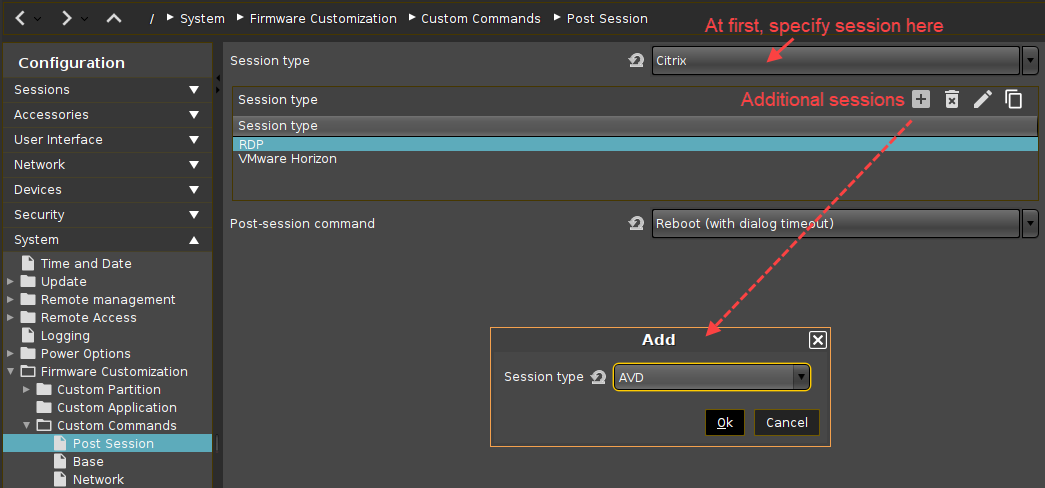
Post-session command
Action that is carried out after the end of the session(s) selected above.
Possible options:
-
Logoff*: The user is automatically logged off; a login method must be defined for this purpose. Further information can be found under IGEL Smartcard, Active Directory / Kerberos and Smartcard.
The “Logoff” option cannot be used if the Appliance Mode is in use. Further information can be found under Appliance Mode.
-
Shutdown/suspend (system default action): The device will be shut down or placed in a standby mode depending on the setting under System > Power Options > Shutdown > Default action selection. A dialog allowing the user to cancel the procedure will be shown in the process. Further information can be found under Shutdown.
-
Shutdown/suspend (system default action without dialog): The device will be shut down or placed in a standby mode depending on the setting under System > Power Options > Shutdown > Default action selection. The user cannot cancel the procedure.
-
Reboot (with dialog timeout): The device will reboot. A dialog allowing the user to cancel the procedure will be shown in the process.
-
Reboot (without dialog): The device will reboot. The user cannot cancel the procedure.
-
Enter custom command here: Command to be executed.
*IGEL OS system default