
How to Integrate Cisco Identity Services Engine (ISE) pxGrid Direct Connect and IGEL UMS
Cisco ISE (Identity Services Engine) is a comprehensive, policy-based access control and identity management system developed by Cisco. It is widely used in enterprise networks to enhance security, streamline network access, and ensure compliance.
Key Features of Cisco ISE
Network Access Control (NAC)
Authenticates and authorizes users and devices before granting access to the network
Supports wired, wireless, and VPN access
Policy Enforcement
Allows administrators to define granular access policies based on user roles, device types, location, and other contextual data.
Guest Access Management
Provides secure guest access with customizable portals and self-registration options
BYOD (Bring Your Own Device) Support
Enables secure onboarding and management of personal devices without compromising network security
Posture Assessment
Evaluates the security posture of endpoints (e.g., antivirus status, OS updates) before allowing access
Integration with Other Cisco Products
Works seamlessly with Cisco switches, routers, wireless controllers, and firewalls
Integrates with Cisco TrustSec for scalable security policies
Visibility and Reporting
Offers detailed visibility into who and what is on the network
Provides rich reporting and analytics for compliance and troubleshooting
Use Cases
Enterprises looking to secure access to their networks
Organizations implementing Zero Trust architectures
Compliance-driven industries like healthcare, finance, and government
What Is Cisco ISE pxGrid Direct with CMDB?
Cisco ISE pxGrid Direct Connect with CMDB allows Cisco Identity Services Engine (ISE) to connect directly to external Configuration Management Databases (CMDBs), such as IGEL Universal Management Suite (UMS), using REST APIs. This enables real-time sharing and enrichment of endpoint data for improved network visibility, policy enforcement, and asset management.
What Does pxGrid Direct Do?
Introduced in Cisco ISE 3.2 and enhanced in subsequent versions, pxGrid Direct allows ISE to:
Connect directly to external REST APIs, such as those provided by CMDBs to fetch JSON-formatted endpoint data
Use that data in authorization policies without querying the external system every time.
This integration eliminates the need for custom connectors or intermediary platforms, streamlining the process of enriching ISE's context database with valuable asset information. This is especially useful for integrating with CMDBs, where device attributes (e.g., OS version, asset tags, compliance status) are stored.
By integrating Cisco ISE with CMDBs through pxGrid Direct, organizations can achieve a more comprehensive and dynamic security posture, leveraging detailed asset information to inform and enforce network access policies.
How It Works with CMDBs
Connector configuration: Within ISE, administrators can set up a pxGrid Direct connector by specifying the REST API endpoint of the CMDB, along with authentication credentials.
Data mapping: The connector is configured to identify and map relevant attributes from the CMDB's JSON data - such as asset tags, operating systems, IP addresses, and more - into ISE's dictionary. (See "Configure and Troubleshoot ISE 3.3 pxGrid Direct" by Cisco)
Identifier specification: Two critical identifiers are defined:
Unique identifier: A distinct attribute in the CMDB (e.g., a system ID) that uniquely identifies each asset.
Correlation identifier: An attribute used to match CMDB records with ISE's existing endpoint data (e.g., MAC address or hostname). (See "Configure and Troubleshoot ISE 3.3 pxGrid Direct" by Cisco)
Data synchronization: ISE can be configured to perform full or incremental data synchronizations at defined intervals, ensuring that the imported asset information remains current.
Policy enforcement: The enriched data from the CMDB can then be utilized in ISE's authorization policies, allowing for more granular and informed access control decisions.
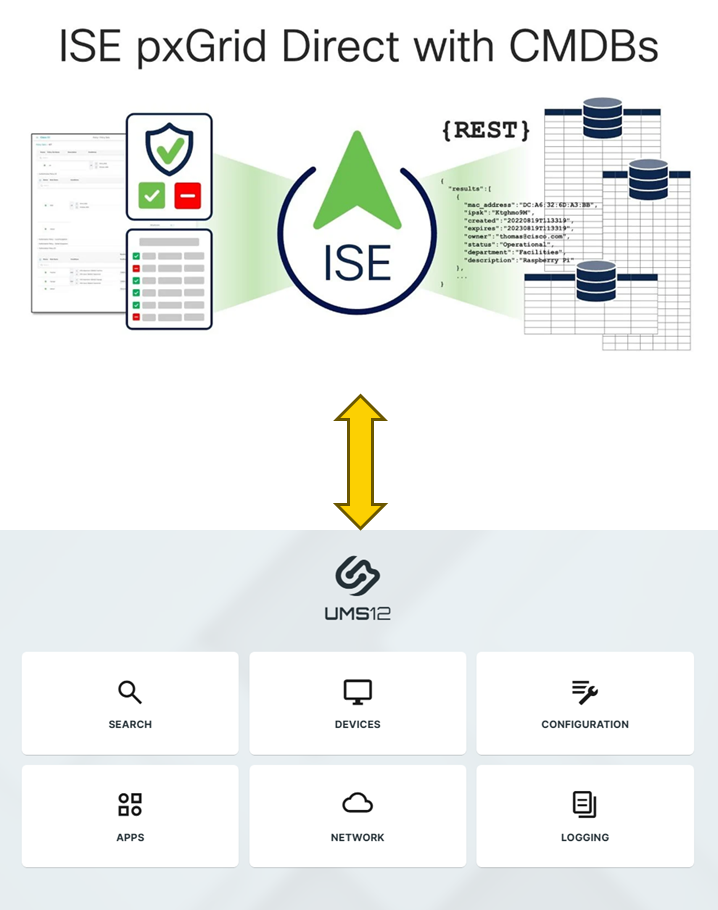
Integration Overview: Cisco ISE pxGrid Direct + IGEL UMS via IMI
Cisco ISE’s pxGrid Direct can integrate with IGEL Universal Management Suite (UMS) via its RESTful API, known as the IGEL Management Interface (IMI). By enabling this integration, organizations can retrieve detailed endpoint information from IGEL-managed devices, enhancing ISE’s network visibility and enabling policy-based access control for IGEL-managed devices.
What Is IMI?
The IGEL Management Interface (IMI) is a RESTful API that allows external systems to interact with IGEL UMS. IMI is platform-agnostic and designed for interoperability. It supports operations like:
Listing endpoint devices
Reading device attributes (e.g., MAC address, IP address, firmware version)
Managing device states (e.g., reboot, move between directories)
For more information, see these articles on the IGEL KB: IGEL Management Interface (IMI)
Requirements
Cisco ISE version 3.2 Patch 2 or higher
IGEL UMS 12.08.130 or higher
An appropriate license. Please note that add-on licenses may be required for certain features within IGEL OS (e.g., 90Meter). UMS Standard, Enterprise, Healthcare, or Government editions include the IMI feature; for details, see IGEL OS Editions.
Integration
By configuring pxGrid Direct to communicate with IGEL’s IMI, ISE can import asset information like MAC addresses, device names, firmware versions, enrollment status, and more. This data can then be used to inform and enforce network access policies within ISE.
Implementation Steps – IGEL UMS
Install or upgrade to UMS version 12.08.130 or higher.
Ensure that IGEL UMS is accessible via its IMI REST API, typically on port 8443. See this KB article - Prerequisites
Create a UMS admin account with Read/Browse permission at the Devices level. No global UMS admin permissions are required.
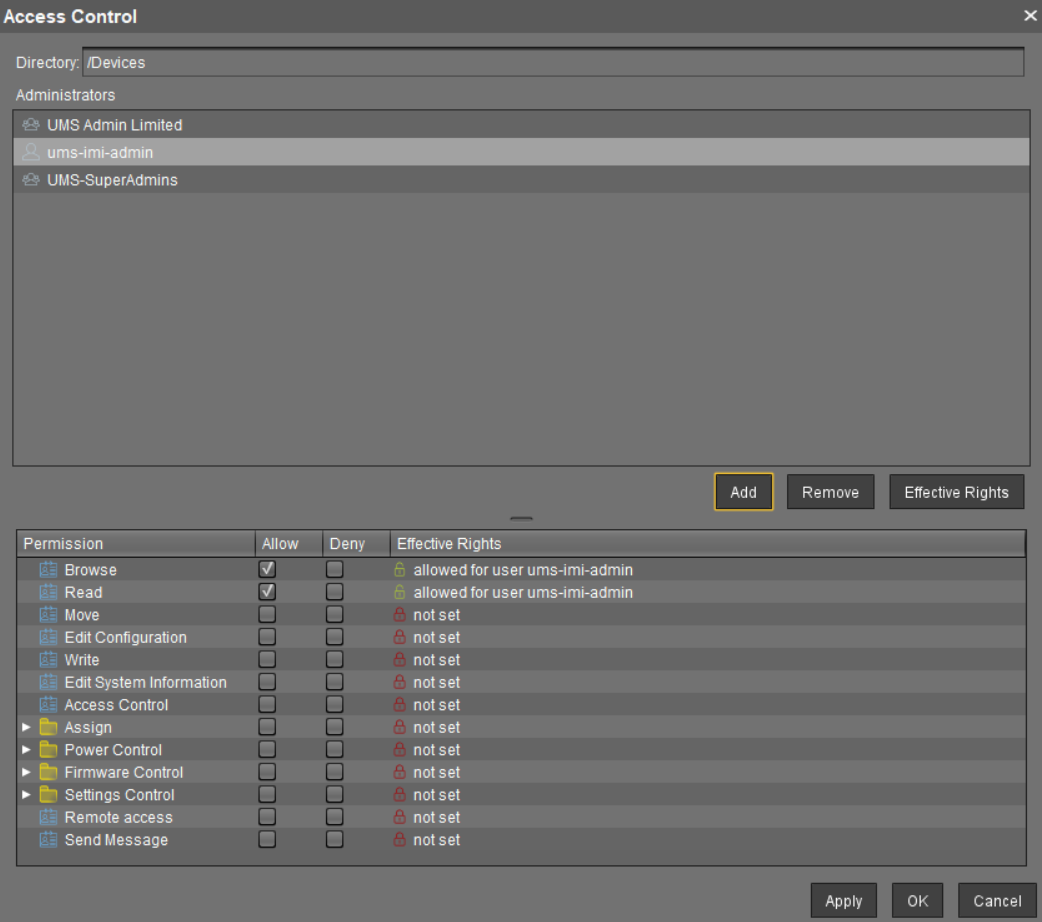
To enable direct authorization for IMI calls, open
<INSTALLATION DIRECTORY>\rmguiserver\conf\catalina.propertiesand add the following line to it:de.igel.imi.directAuthorization=true

Restart the UMS.

IMI uses HTTPS to ensure the integrity and confidentiality of the network traffic. It is good practice to use a valid server certificate with a verifiable signature. Most clients and ibraries can be configured to work with self-signed or invalid certificates, but that should not be done in a production environment.
If certificate validation is required, ISE must trust the root chain that signs the UMS certificate.
Integration Steps – Cisco ISE pXGrid Direct Connect
This procedure involves a script that derives a structure tag from the device’s MAC address. It also works with devices that have multiple network devices (Ethernet, Wifi). The script is deployed on the device via a UMS profile.
In ISE, create a pxGrid Direct connector pointing to the IGEL IMI endpoint. This can be either of these two options:
GET /v3/thinclients
Example:https://[UMS_server]:8443/umsapi/v3/thinclients?facets=details&response-wrapper=trueGET /v3/thinclientview/{viewId}
Example:https://[UMS_server]:8443/umsapi/v3/thinclientview/{viewId}?facets=details&response-wrapper=true
Important: Wrapper/Category Required
ISE needs a wrapper/category to show the results in a dictionary. For the thinclient and thinclientview endpoint URL, use the wrapper results in ISE to direct to these results.
Example request:
GET {{url}}/umsapi/v3/thinclients?facets=details&response-wrapper=true
Authorization: Basic {{authBasic}}
Example Response (snippet):
{
 "results": [
  {
   "unitID": "0050569373B6",
   "mac": "0050569373B6",
   ...
   "registrationDate": "04.06.2025 08:09:56",
   "isThinClientRegistered": "true",
   ...
  }
 ]
}
Identify and map the relevant attributes from IGEL’s IMI to ISE’s endpoint attributes.
Mandatory | Optional (but key for C2C/Compliance) |
|
|
In the UMS, create a profile and go to System > System Customization > Custom Commands > Network.
Enable the field Final network command and enter the following script into it:
rmagent-set-structure-tag -t $(ip addr show | awk '
  /^[0-9]+: [^:]+:/ {
    iface = $2; sub(":", "", iface)
    state = /state UP/ ? "UP" : "DOWN"
  }
  /link\/ether/ && state == "UP" && iface != "lo" {
    if (iface ~ /^en/ || iface ~ /^eth/) {
      print toupper($2); exit
    } else if (!wifi) {
      wifi = toupper($2)
    }
  }
  END { if (!mac) print wifi }
')

sleep 2

rmagent-update-device-info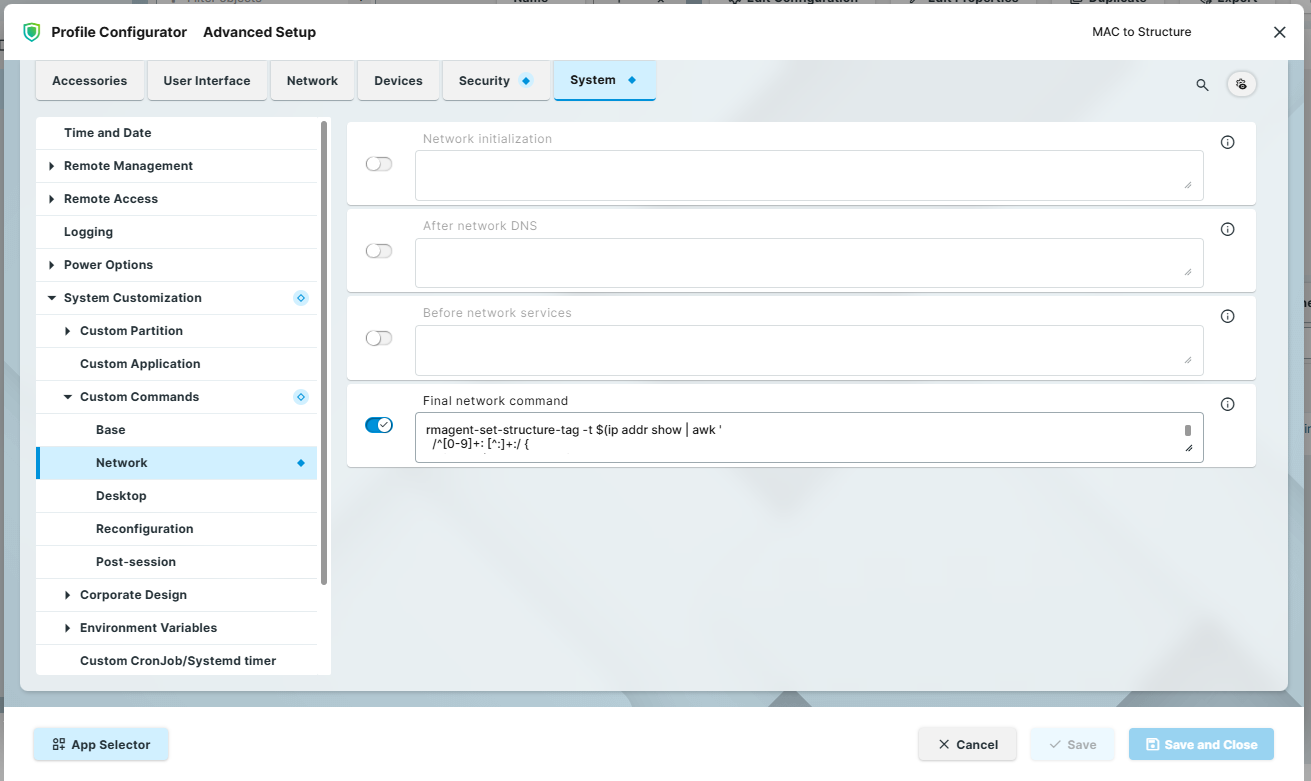
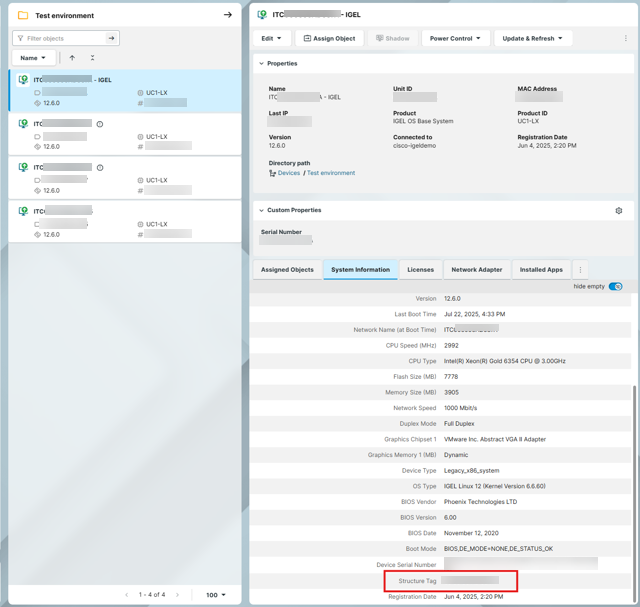
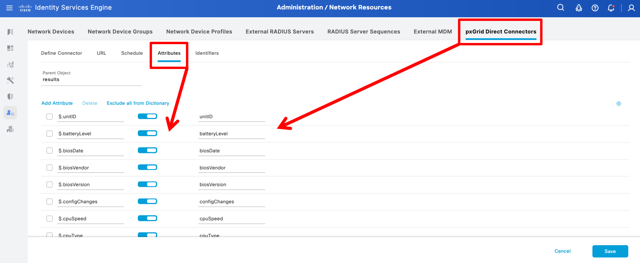
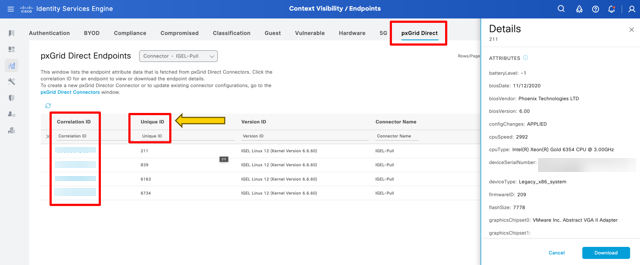
Configure pxGrid Direct to perform regular data synchronizations, ensuring that ISE has up-to-date information from IGEL UMS.

Currently, the lowest automated setting is 12 hours, but it can be run manually.
Considerations
Data accuracy: Regularly verify that the data imported from IGEL UMS is accurate and reflects the current state of your endpoints.
Security: Ensure secure communication between Cisco ISE and IGEL UMS by using HTTPS and proper authentication mechanisms.