
This article shows the configuration of remote management options in IGEL OS 12.
Menu path: System > Remote Management > Options
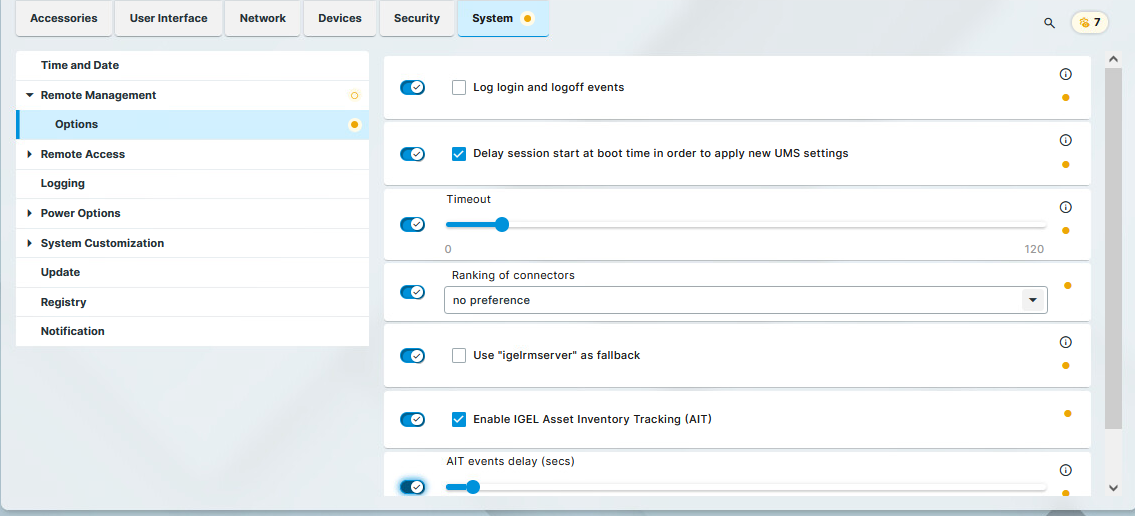
Log login and logoff events
- Details of logon and logoff events of the following logon types are sent to the UMS:
-
Active Directory/Kerberos
-
Single Sign-On
-
Local User
-
Guest User
-
UMS Identity Broker
Events are only logged if the Enable user logon history parameter is enabled in the UMS Console, under UMS Administration > Global Configuration > Misc Settings. For more information, see (12.05.100-en) Misc Settings in IGEL UMS.
- Login and logoff events are not sent to the UMS. (Default)
The logged events can be found both in the UMS Console and the UMS Web App. For more information, see (12.05.100-en) View Device Information in the IGEL UMS.
Delay session start at boot time in order to apply new UMS settings
If new settings were made in the UMS, the device may receive them during the boot procedure. After the device connects to the UMS at boot time, new settings might be transferred to the device.
- The start of the sessions will be delayed until the settings have been transferred or the time limit defined under Timeout has been exceeded.
- The start of the sessions is not delayed. (Default)
Timeout
Delay in seconds after which the sessions get started during the boot procedure. (Default: 10)
Ranking of connectors
Defines the order in which the device connects to the configured device connectors based on their connector types. Connector types are listed in System > Remote Management > Universal Management Suite.
Possible options:
-
no preference (default)
The device connects randomly to any configured device connector, regardless of the connector type. -
prefer UMS
The device will try to connect to the UMS Servers first (that is, the connections listed with the ums connector type are contacted first).
The device will only try to connect to an ICG if UMS Servers are not reachable or configured. -
prefer ICG
The device will try to connect to an ICG (that is, the connections listed with the icg connector type are contacted first).
The device will only try to connect to a UMS server if no ICG is reachable or configured.
Use "igelrmserver" as fallback
Starting from IGEL OS 12.8.0, the DNS entry igelrmserver is only used during the device registration process by default. It can be configured as a fallback if no other UMS addresses are available.
- To connect to the UMS, the device will first try to connect through all configured UMS and ICG addresses. If those connection do not work and the FQDN of the
igelrmservercan be resolved to an IP address, the device will use that as a fallback. - To connect to the UMS, the device will try to connect through all configured UMS and ICG addresses. The device will not use the
igelrmserveraddress as a fallback option. (Default)
Enable IGEL Asset Inventory Tracking (AIT)
IGEL Asset Inventory Tracking (AIT) has the following requirements:
-
Universal Management Suite (UMS) 12.08.100 or later
-
Valid Enterprise license
- The endpoint device sends data about all connected USB and Bluetooth devices to the UMS. The data is sent if one of the following applies:
- The device boots
- A periphery device is plugged in/off
- The UMS triggers a refresh of the asset information - No data is sent to the UMS.
AIT events delay (secs)
The time delay in seconds after which an event, such as connecting a headset, is communicated to the UMS. This can be used to accumulate several events in one message to the UMS, which saves resources: All events that occur after an event has started the delay timer and before the delay timer has expired are sent as one message together with the first event. If the delay is set to 0, each event is sent immediately in a single message to the UMS:
Possible values: 0 … 180