
Der folgende Artikel erklärt, welche Dienste und Prozesse laufen, wenn Sie die High Availability (HA) Erweiterung des IGEL Universal Management Suite (UMS) installieren. Er bietet jedoch auch einen allgemeinen Überblick darüber, wie Sie Dienste und Prozesse für Ihre UMS-Installation neu starten können, nicht unbedingt für die UMS-HA-Installation.
Eine High Availability (HA)-Installation besteht aus mehreren Prozessen: Auf jedem Knoten des HA-Netzwerks läuft entweder der UMS Server oder der UMS Load Balancer oder beides, je nachdem, welche Konfiguration Sie während des Installationsprozesses des UMS HA gewählt haben, siehe auch IGEL UMS HA Konfigurationsoptionen. Darüber hinaus läuft der UMS Watchdog immer auf jedem Knoten.
|
UMS Server |
|
|
UMS Lastverteiler |
|
|
UMS Watchdog |
|
Wenn sowohl der UMS Server als auch der UMS Load Balancer auf demselben Server laufen, verwendet der UMS Server den Port 30002 und der UMS Load Balancer den Port 30001. Wenn nur der UMS Server auf einem Server installiert ist, lauscht er immer auf Port 30001. Siehe IGEL UMS Communication Ports.
Die folgende Tabelle zeigt, wie Sie herausfinden können, welche Prozesse laufen und wie/wo Sie sie anhalten oder starten können.
|
Windows |
Linux |
|---|---|
|
Dienstleistungen: 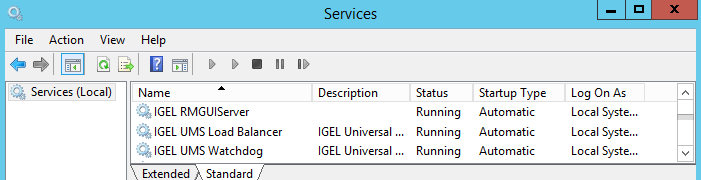
Hier werden die Prozesse normalerweise angehalten. |
|
|
Aufgaben-Manager: 
Emergency stop if the process cannot be stopped in the Services. |
|
|
cmd / Eingabeaufforderung:
Emergency stop if the process cannot be stopped in the Services:
|
|
|
You can stop / start the UMS Server service also in the UMS Administrator > Distributed UMS, see Distributed UMS - Perform Local UMS Actions in the IGEL UMS Administrator. |
|