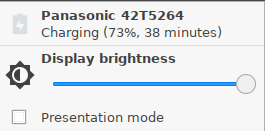
In order to preserve the battery you want to reduce the display brightness.
Respective Tray Icon:
|
Tray Icon Name |
Icon |
Where to configure |
|
Notebook BAT |

|
Menu path: Setup > System > Power Options > Battery |
-
Right-click the battery symbol in the system tray.
The context menu opens.
-
Click the slider of the brightness display to reduce the Display Brightness.