
Using Local Logon settings, described in this article, you can prepopulate user data for VMware Horizon sessions. As a result, you can avoid users possibly having to log in a number of times.
Menu path: Sessions > Horizon Client > Horizon Client Global > Local Logon
Local Logon Configuration for VMware Horizon
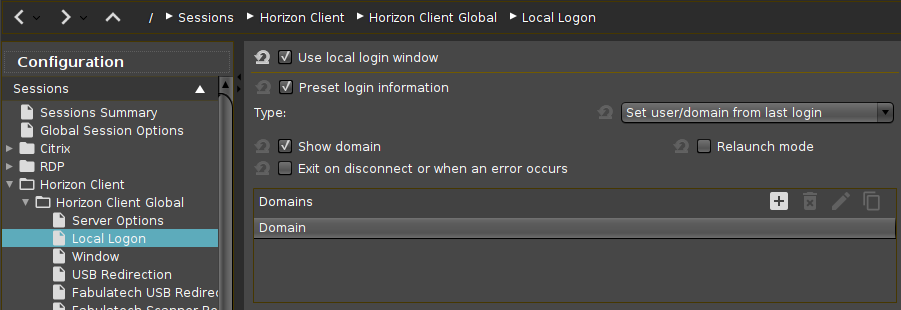
Use local login window
☑ The local login window of the endpoint device will be used to log in to the server. If you use the local login window, you can prepopulate login information.
☐ The local login window will not be used.*
Preset login information
☑ Login information will appear automatically in the login window. With Type, you can specify the source of the login information.*
Type
-
Set user/domain from last login: The login information from the last session will appear automatically in the login window.*
-
Set user/domain from session setup: Session-specific login information will appear automatically in the login window. The session-specific login information is described under Connection Settings.
Show domain
☑ The domain will be shown in the login window.*
Relaunch mode
☑ The login window is shown in relaunch mode and cannot be closed.
☐ The login window is not shown in relaunch mode.*
Exit on disconnect or when an error occurs
☑ The session will be ended completely when the connection is terminated.
☐ The connection overview will be shown when the connection is terminated.*
Domain
This is how you can work with the domain list:
->Click 
->Click 
->Click 
->Click 
Further settings options can be found under Security > Active Directory / Kerberos and Security > Logon > Active Directory / Kerberos.
*IGEL OS system default