
Issue
You want to connect to a Telnet service and can't find a Telnet command on the device.
Solution
Using Ericom Powerterm (Requires the Ericom Powerterm Firmware Feature):
-
In Setup, go to Sessions > PowerTerm Terminal Emulation > PowerTerm Sessions.
-
Create a new session.
-
Edit the session.
-
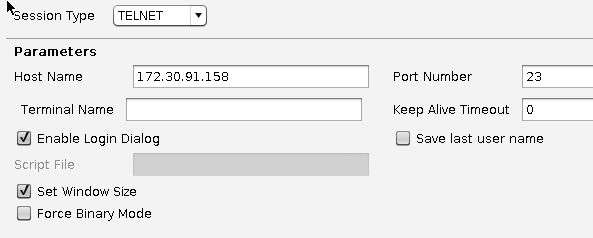
Under Connection, make the following settings:
-
Select TELNET as Session Type.
-
Enter an IP adress or a name in Host Name.
-
If you want to use a graphical login dialog, activate Enable Login Dialog.
-
-
Under Desktop Integration enter a Session Name and enable the desired Starting Methods for the Session.
-
Click Apply to save your settings or OK to save and exit.
-
Start the new session and enter your username and password.