
The IGEL OS Desktop

You can operate the device via the taskbar and the IGEL menu.
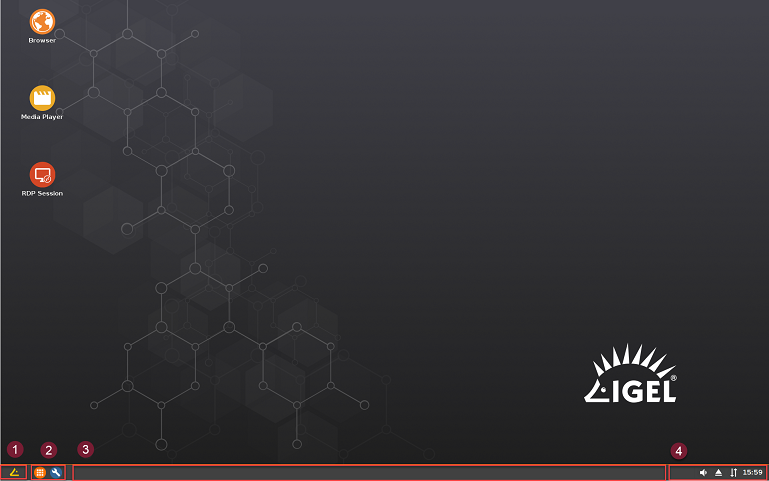
image2019-2-12_11-44-57.png

The following items can be found in the taskbar at the bottom of the screen:

7974.png


IGEL_Startmenu v10 Opens the IGEL menu.

7975.png

Quick Start Panel


Application Launcher 32x32 Application Launcher: Opens a dialog window with start symbols for sessions.


IGEL setup 32x32 Setup: Opens the IGEL setup.


image2019-2-12_11-48-4.png image2019-2-12_11-48-34.png image2019-2-12_11-48-54.png Symbol for sessions: Launches a session.

7976.png


Window bar


Allows you to switch between open windows.

7977.png


System tray


image-20240609-204352.png CPU power plan: Changes the power saving settings.


image-20240626-121652.png Volume control


image-20240626-121659.png Allows you to remove a USB stick safely


image-20240626-121703.png Local network connection


image-20240626-121706.png Time / date


The IGEL menu offers the following areas and functions:

  • Sessions: Allows you to launch sessions

  • System: Allows you to launch system programs

  • About: Shows all relevant system information

  • Search window: Allows you to find sessions and functions in the start menu

  • image-20240609-204538.png Allows you to shut down the device

  • image-20240609-204617.png Allows you to restart the device