You use fibre-to-USB adaptors with your IGEL OS 12 devices. IGEL OS can see the adaptor, but no network trafic is transmitted.
Problem
Some USB ethernet fiber adaptors work with 4.4.x kernel but not with newer ones.
Solution
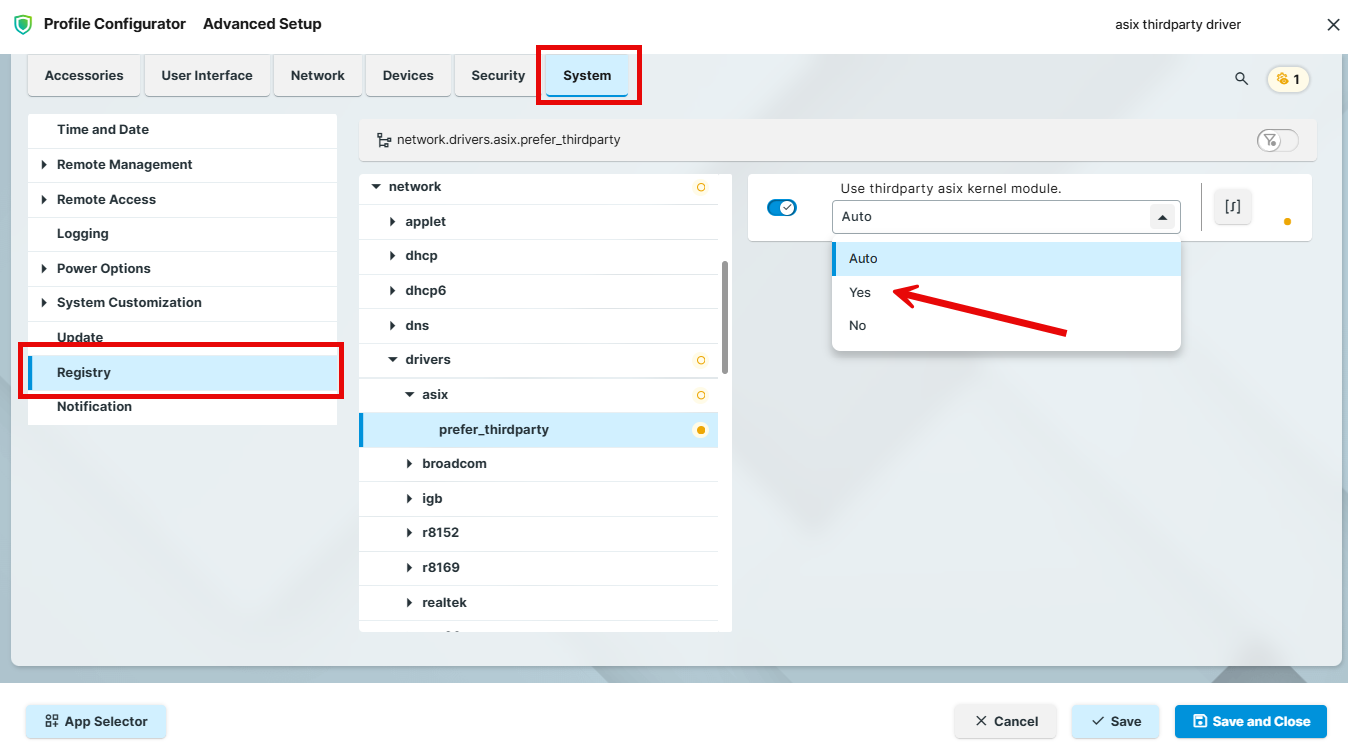
As of IGEL OS 12.7.1, you can activate the asix_thirdparty driver to get some fibre USB ethernet adapters to work.
-
In the Profile Configurator, create a profile for IGEL OS Base System. For more information on profile creation, see How to Create and Assign Profiles in the IGEL UMS Web App.
-
Go to System > Registry and enbale the following registry key:
|
Parameter |
Use thirdparty asix kernel module. |
|---|---|
|
Registry |
|
|
Range |
[Auto] [Yes] [No] |
|
Value |
Auto |