
SCEP is a protocol for certificate management that supports the secure issuance of certificates to network devices.
Requirements
Applying Microsoft patch KB5014754 to your NDES server may break requests for certificates from clients using SCEP clients for authentication. This includes IGEL OS devices.
Currently, there is no official workaround or patch from Microsoft.
-
SCEP server
The following SCEP server implementations can be used with IGEL OS:-
Windows 2008 Server with the Network Device Enrollment Service (NDES) role
-
Windows 2012 Server
-
Windows 2016 Server
For information on how to deploy the NDES, see http://aka.ms/ndes.
-
-
Connection between the SCEP server and the certification authority (CA).
Technical Background
The Simple Certificate Enrollment Protocol (SCEP) defines a way of automatically enrolling certificates for the authentication of network devices or VPNs. The client uses HTTP requests to fetch root certificates, to send certificate requests, and to fetch client certificates from the server.
For an in-deep description, see the Microsoft technet article "Network Device Enrollment Service (NDES) in Active Directory Certificate Services (AD CS)" under http://aka.ms/ndes.
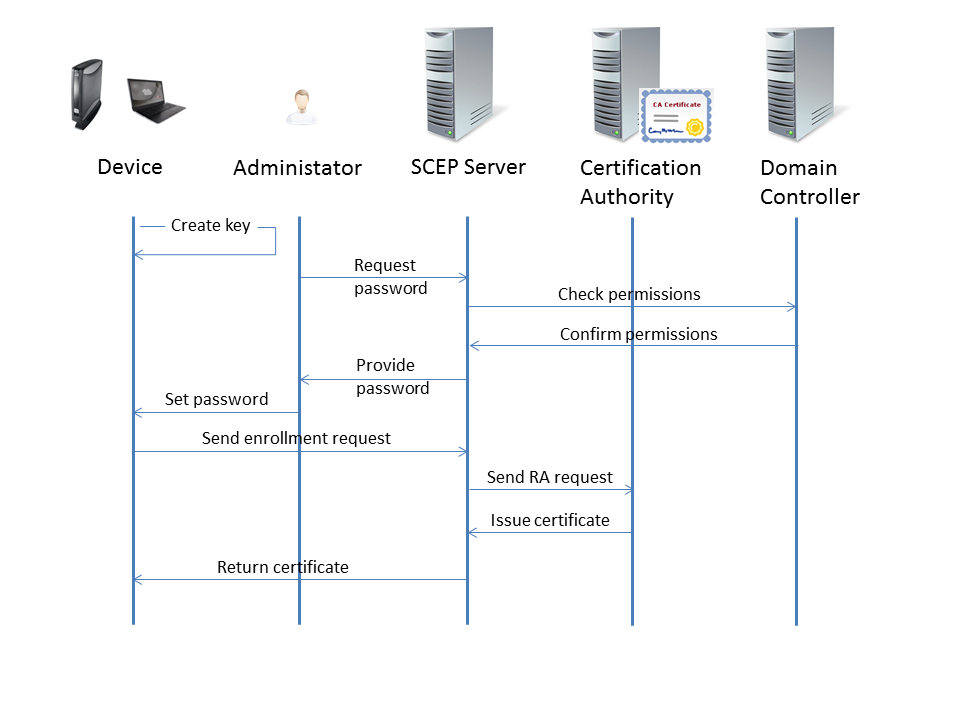
Here is a typical certificate enrollment process:
-
The device creates an RSA public-private key pair.
-
The administrator requests a challenge password from the SCEP service (e. g. NDES).
The challenge password is only required for the first enrollment request. For certificate renewal, the current certificate is used for authentication.
-
The SCEP server asks the domain controller if the administrator holds the required permissions for the configured certificate templates.
-
The domain controller confirms that the administrator holds the required permissions.
-
The SCEP server creates a challenge password and hands it over to the administrator.
Typically, the challenge password expires after a defined time. With the NDES that is included in Windows 2008 Server, the default expiry time is 60 minutes.
-
The administrator provides the device with the challenge password, the CA identifier, and the fingerprint of the CA certificate.
-
The device sends the enrollment request to the SCEP server, using the challenge password to authenticate with the SCEP server. This action is triggered by the administrator.
-
The SCEP server signs the enrollment request with its enrollment agent certificate and sends it to the CA.
-
The CA issues the desired certificate and returns it to the SCEP server.
-
The SCEP server returns the certificate to the device.
Additional Settings in the Registry
There are some SCEP configuration options that are only available in the form of registry keys. In this section, you can find information on the most important settings.
You can find these registry keys through the search in the configurator with Include Registry enabled. For details, see Registry in IGEL OS 12.
Automatic Password Retrieval (NDES only)
When automatic retrieval is enabled, the device extracts the NDES challenge password from the NDES server (https://<HOSTNAME>/certsrv/mscep_admin).
To enable automatic retrieval of the NDES password, make the following settings in System > Registry:
-
Set
network.scepclient.cert%.use_ready_made_challenge_password_commandto NDES. -
Set
network.scepclient.cert%.ndes.challenge_password_retrieval.userto the username with which the NDES challenge password can be retrieved from the NDES server (https://<HOSTNAME>/certsrv/mscep_admin). -
Set
network.scepclient.cert%.ndes.challenge_password_retrieval.crypt_passwordto the password with which the NDES challenge password can be retrieved from the NDES server (https://<HOSTNAME>/certsrv/mscep_admin). -
If you want HTTPS to be used, you have two options:
-
Set
network.scepclient.cert%.ndes.challenge_password_retrieval.cacertto from getca operation. -
Enter the appropriate certificate under
network.scepclient.cert%.ndes.challenge_password_retrieval.cacert
-
-
If you want to use unsecured HTTP, set
network.scepclient.cert%.ndes.challenge_password_retrieval.cacertto none (not using https). -
If you want to use Kerberos instead of the Default method NTLM, set
network.scepclient.cert%.ndes.challenge_password_retrieval.authto Kerberos. Please note that for Kerberos authentication, Security > Active Directory/Kerberos must be enabled, and the domain must be configured there.
Renewal from Scratch
Some 3rd party SCEP providers (for example, Venafi or Sectigo) do not allow the fast renewal method and instead require a renewal from scratch. When the SCEP environment does not support certificate renewal in the default SCEP sense, you need to change the renewal method. For these environments, starting over with the challenge password in the CSR needs to be enabled.
→ To enable the start-over renewal, set network.scepclient.cert%.renewal_method to Start-over.