
This article shows how to configure the integration of the on-screen keyboard in IGEL OS.
Menu path: User Interface > Input > Touchscreen > On-screen keyboard > Application Integration
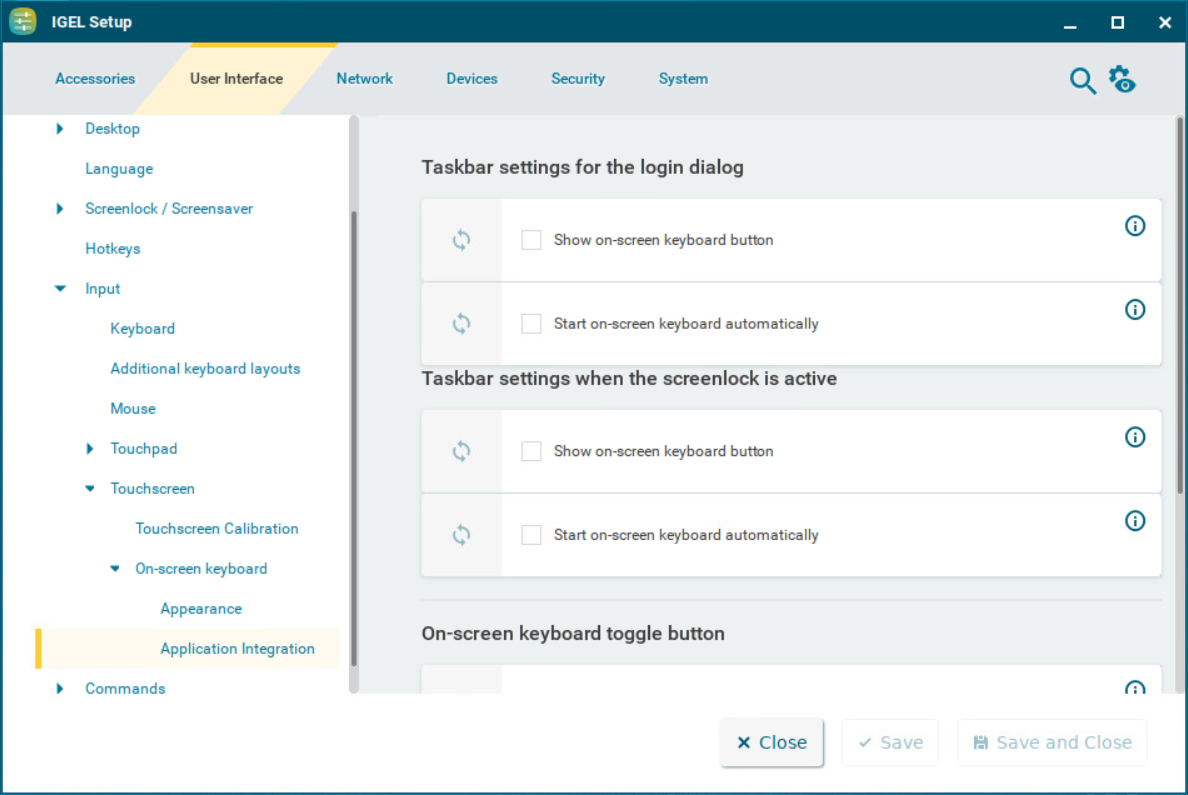
Taskbar Settings for the Login Dialog
These settings are relevant if a login is necessary in order to use the device. This applies to all logon methods that are possible with the device.
Show on-screen keyboard button
☑ A button for launching the on-screen keyboard is shown during the login dialog.
☐ The on-screen keyboard cannot be launched during the login dialog. (Default)
Start on-screen keyboard automatically
☑ The on-screen keyboard is shown during the login dialog and can be used for input.
☐ The on-screen keyboard is not shown during the login dialog. However, it can be launched via a button if Show on-screen keyboard button is enabled. (Default)
Taskbar Settings When the Screenlock Is Active
Show on-screen keyboard button
☑ A button for launching the on-screen keyboard is shown when the screen is locked.
☐ The on-screen keyboard cannot be launched when the screen is locked. (Default)
Start on-screen keyboard automatically
☑ The on-screen keyboard is shown when the screen is locked.
☐ The on-screen keyboard is not shown when the screen is locked. However, it can be launched via a button if Show on-screen keyboard button is enabled. (Default)
On-Screen Keyboard Toggle Button
Show button
☑ A button for switching the on-screen keyboard on and off is shown on the desktop.
☐ The toggle button is not shown. (Default)
Button size
The size of the toggle button. A size between 40 and 80 pixels can be chosen. (Default: 60px)
Automatically show on-screen keyboard when text field is selected
☑ The on-screen keyboard is shown automatically when an input field is selected.
☐ The on-screen keyboard is not shown automatically. (Default)