
The Universal Management Suite (UMS) Administrator command-line interface (CLI) allows you to control the IGEL UMS Administrator via a terminal and to automate UMS Administrator actions via scripting. Among these actions are creating and editing database connections for the UMS Server, backing up and restoring the embedded database, configuring communication ports and security, managing the UMS ID, configuring the superuser, and restarting the UMS Server.
As this feature allows complete control without any graphical desktop environment, it is possible to run the CLI application on headless Linux systems.
As of UMS 12.08.100, there is an additional umsadmin-cli.sh script that provides the same functionality as umsadmin-cli.bin on Linux machines, but without the QT dependency. It can be used whenever QT dependencies are not available or not wished, like on headless Linux machines or containers.
If the QT dependency is installed, you can freely decide between .sh or .bin scripts.
Basic Usage
Like the graphical UMS Administrator application, the CLI requires elevated privileges.
→ Windows: Open a command prompt (cmd.exe) as Administrator.
→ Linux: Become root or use sudo
You can run the main command umsadmin-cli from any directory, as the command is made available on the PATH.
→ To see the global options and the primary subcommands, enter umsadmin-cli
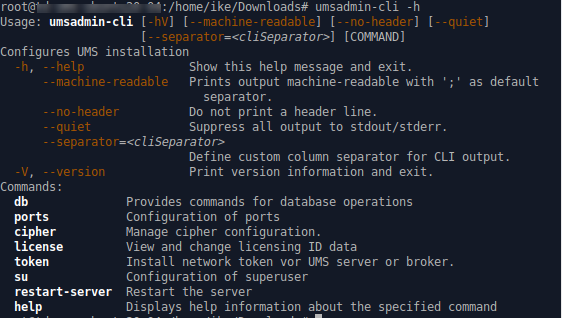
→ To get all possible options for a specific subcommand, enter umsadmin-cli followed by the subcommand, e.g. umsadmin-cli db create
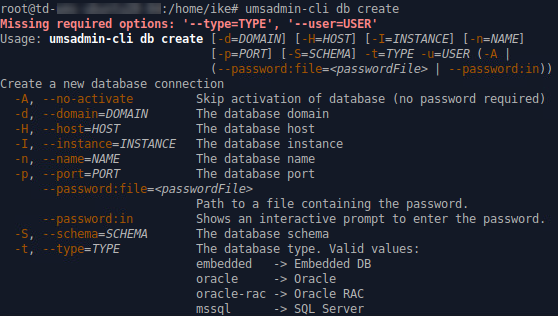
Certain subcommands have no options and run immediately. Please refer to the Command Reference.
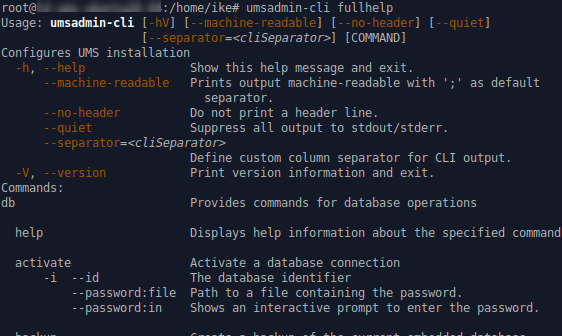
→ To get the complete online help with all commands, enter umsadmin-cli fullhelp
→ To get the list of available commands, enter umsadmin-cli help
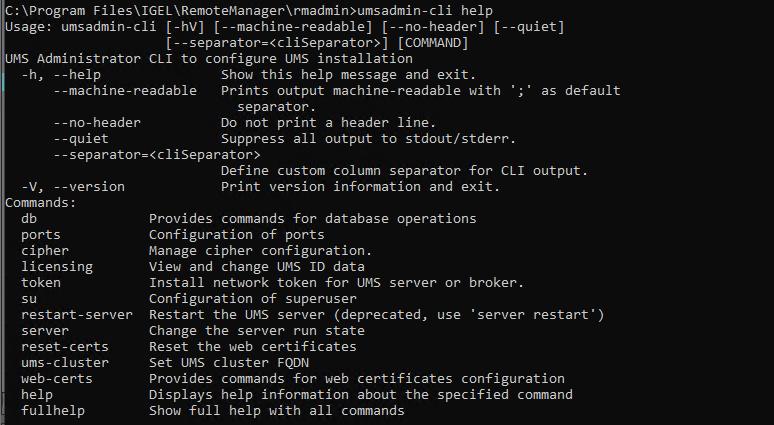
→ To display help information about any command, use help as a subcommand. For example, enter umsadmin-cli web-certs help
Global Options
If you intend to use the UMS Administrator CLI in a script, you may want to configure its output to stdout/stderr according to your needs. This makes it easy to further process the output of umsadmin-cli and extract any relevant data.
Please see the available options below.
--machine-readable
Prints output machine-readable with a semi-colon (;) as default separator.
Example:
root@machine:/home/locadmin# umsadmin-cli --machine-readable db list
ACTIVE;DATABASE;HOST;USER;DB-TYPE;ID
true;rmdb;localhost;root;Embedded DB;1
--no-header
No header line is printed. (Not all commands print a header.)
Example:
root@machine:/home/locadmin# umsadmin-cli --machine-readable --no-header db list
true;rmdb;localhost;root;Embedded DB;1
--quiet
All output to stdout/stderr is suppressed for some commands which might take a long time to execute. These are, for instance, db backup, db restore, db copy, and server-restart.
Example:
root@machine:/home/locadmin# umsadmin-cli --quiet db backup -o /tmp/mybackup02.pbak --full
root@machine:/home/locadmin#
It is still possible to redirect all output to a null device using operating system functions. For example, to redirect standard output and error output to the null device on Linux, use:
command … >/dev/null 2>&1
--separator
Defines a custom column separator for output to stdout/stderr.
Example:
root@machine:/home/locadmin# umsadmin-cli --machine-readable --no-header --separator "||" db list
true||rmdb||localhost||root||Embedded DB||1
Some separator characters, such as the pipe symbol (|), require quotes because they have special functions in terminals.
Exit Codes
|
Exit Code |
Meaning |
|---|---|
|
0 |
Successful execution |
|
1 |
Internal error. An error number is outputted to stderr; for details, see Error Numbers. |
|
2 |
Wrong usage of the CLI or invalid arguments |
Command Reference
General Usage of Password Options
Some commands require a password. Entering the password in plain text on the command line is not secure and therefore not possible. Therefore, one of the following password options must be used:
--password:in for interactively entering the password (possibly with confirmation)
--password:file <FILE> for providing a file containing the password
A password file must have the password as the first line and the passwords must not be pure whitespace. Additional lines with content are allowed but will not be evaluated.
UMS Server Restart Required
Most of the commands in the sections "Ports", "Cipher", "Reset Certificates", and "Superuser" change the UMS configuration and a restart of the UMS server is required to make the new settings take effect. This can be done in two ways:
-
Use the appropriate function of the OS (e.g.
systemctlon Linux) -
Use the command
umsadmin-cli server restart
Database
Ports
Cipher
Manage Web Certificates
Accept Expired Client Certificates
Superuser
UMS ID
UMS License
Network Token
UMS Cluster
Server
Encrypting and Encoding
Error Numbers
The error numbers are printed in the following format:
<E-NNNN>: <HUMAN READABLE MESSAGE>
Some error descriptions in the following table contain the phrase „[param]“. These will be replaced during runtime with details for the relevant error, e.g. the problematic path for E-1030.
|
Error number |
Error description |
|---|---|
|
1000 |
Unable to connect to database. UMS server may be down. |
|
1001 |
Cannot get database configurations. |
|
1002 |
Cannot create database. |
|
1003 |
Cannot activate database. [param] |
|
1004 |
Internal error while activating database. |
|
1005 |
Database already exists in this configuration. |
|
1006 |
Database type is unknown. |
|
1007 |
Database is already activated. |
|
1008 |
Cannot edit database configurations. |
|
1009 |
Internal error while optimizing database. |
|
1010 |
The active data source type is not Embedded or Derby and does not support optimization. |
|
1011 |
Test of the active data source failed. |
|
1012 |
No database is activated. |
|
1013 |
Cannot deactivate database. |
|
1014 |
No database is active or the active database is not of type 'Embedded' or 'Derby'. |
|
1020 |
Database could not be deleted. |
|
1030 |
The specified directory for the backup does not exist: [param] |
|
1031 |
Internal error while attempting database backup. |
|
1040 |
The specified backup file was not found. |
|
1041 |
The specified backup file has an invalid file type. |
|
1042 |
Unable to read the specified backup file. |
|
1043 |
Internal error while activating data source after restore. |
|
1044 |
Internal error while attempting to restore database. |
|
1045 |
The active data source is not embedded or there is no active data source. |
|
1051 |
Authentication error or internal error when an attempt was made to copy the database |
|
1052 |
Error Accessing credentials of source database |
|
1090 |
A name is required for non-embedded database types. |
|
1091 |
Activation failed, incorrect password provided. |
|
1092 |
Backup failed, the specified file already exists. |
|
1093 |
Port number is required for non-Embedded database. |
|
1094 |
A data source of the Embedded type cannot be edited. |
|
1095 |
No such data source with this ID. |
|
1100 |
The name 'rmdb' is reserved for the Embedded database. |
|
2000 |
Internal error while reading port configuration. |
|
2001 |
Internal error while setting port configuration. |
|
2002 |
Internal error while restarting UMS server. |
|
2003 |
Invalid port number provided. |
|
2004 |
Port number [param] already configured. |
|
3000 |
Internal error while reading cipher data. |
|
3001 |
Internal error while changing cipher configuration. |
|
3002 |
Invalid ciphers provided: [param] |
|
4000 |
Resetting web certificates requires '--yes' option for confirmation. |
|
4001 |
Internal error while resetting web certificates. |
|
5000 |
Internal error while reading superuser credentials. |
|
5001 |
Internal error while writing superuser credentials. |
|
5002 |
No username was provided for new credentials. |
|
5003 |
Unable to set superuser credentials. There is no active data source. |
|
6000 |
Unable to create a new UMS ID. |
|
6001 |
The specified file for the license key backup already exists. |
|
6002 |
No internal license keystore found. |
|
6003 |
Internal error while creating license key backup. |
|
6004 |
Internal error while restoring license key backup. |
|
6005 |
The specified file for the license key backup does not exist. |
|
6006 |
The specified password for the license key backup is incorrect. |
|
6007 |
The specified path for the license key backup does not exist: [param] |
|
7000 |
Token file was not found. |
|
7001 |
Setup type not defined, token not installed. |
|
7501 |
Unable to set UMS cluster FQDN. |
|
7502 |
Unable to show UMS cluster FQDN. |
|
7503 |
Unable to delete the cluster FQDN. |
|
8000 |
Internal error while restarting the UMS server. |
|
8001 |
Internal error while starting the UMS server. |
|
8002 |
Internal error while stopping the UMS server. |
|
8003 |
Internal error while ending the update mode of the UMS Server. |
|
8004 |
Internal error while setting the distributed mode of the UMS installation. |
|
8005 |
Either --enable or --disable must be provided in the options. |
|
8006 |
Distributed UMS not recommended for Derby Embedded Database. |
|
9000 |
An error with the password file occurred: [param] |
|
9001 |
The provided passwords did not match. Aborted. |
|
9002 |
The provided password exceeds the maximum character limit ([param]) or contains only whitespace. |
|
9700 |
File [param] doesn't exist! |
|
9701 |
Keystore contains no certificate entries! |
|
9702 |
Keystore password is invalid! |
|
9703 |
Keystore couldn't be read! |
|
9704 |
Could not import certificate chain! |
|
9705 |
Internal error while importing certificate chain! |
|
9706 |
No SHA1 fingerprint specified! |
|
9707 |
Could not delete certificate(s) with SHA1 fingerprint [param]! |
|
9708 |
Certificate must not be deleted because it is currently in use! |
|
9709 |
Root certificate creation failed! |
|
9710 |
Certificate could not be created! Private key of CA certificate is not known. |
|
9711 |
Certificate could not be created! CA certificate is not valid. |
|
9712 |
Could not find CA certificate with specified fingerprint. |
|
9713 |
Certificate could not be created! CA certificate does not meet the requirements. |
|
9714 |
Certificate could not be created! Requirements for CA certificate creation are not met. |
|
9715 |
Creation of signed certificate failed! |
|
9716 |
Certificate could not be created! Certificate name too long (only 200 characters are allowed)! |
|
9717 |
Could not find certificate with specified fingerprint! |
|
9718 |
Certificate could not be renewed! Certificate has no CA parent. |
|
9719 |
Certificate file [param] doesn't exist! |
|
9720 |
Certificate is invalid! |
|
9721 |
Import of certificate failed! No CA certificate. |
|
9722 |
Import of certificate failed! |
|
9723 |
Import of certificate failed! Certificate is not valid. |
|
9724 |
Import failed! Certificate doesn't contain any subject alternative names. |
|
9725 |
Import of private key failed! File [param] doesn't exist. |
|
9726 |
Import of private key failed! Private key is encrypted. Decrypt it before importing it. |
|
9727 |
Import of private key failed! |
|
9728 |
Certificate already has private key! |
|
9729 |
Import of private key failed! Private key does not match the specified certificate. |
|
9730 |
Export of certificate failed! Directory [param] doesn't exist. |
|
9731 |
Export of certificate failed! |
|
9732 |
Export of certificate chain failed! Directory [param] doesn't exist. |
|
9733 |
Certificate must not be a root or CA certificate! |
|
9734 |
Export of certificate chain failed! |
|
9735 |
Password must be at least 6 characters long! |
|
9736 |
Assignment of certificate failed! |
|
9737 |
Private key is not known! |
|
9738 |
Could not read certificate info! |
|
9739 |
Import failed! Certificate with same fingerprint already exists. |
|
9740 |
Import failed! No valid root certificate. |
|
9741 |
Import failed! Verification of signature failed. |
|
9742 |
Import failed! No valid CA certificate available. |
|
9743 |
Could not read assigned server info! |
|
9744 |
Could not find certificate with specified fingerprint or no server is assigned to certificate! |
|
9745 |
Common name is invalid! Only A-Z, a-z, 0-9, - and . are allowed. |
|
9800 |
Registration of UMS license failed! License file doesn't exist. |
|
9801 |
Registration of UMS license failed! Invalid path specification. |
|
9802 |
Registration of UMS license failed! License file is invalid. |
|
9803 |
Registration of UMS license failed! License file already exists. |
|
9804 |
Registration of UMS license failed! UMS ID doesn't match. |
|
9805 |
Registration of UMS license failed! Invalid signature. |
|
9806 |
Registration of UMS license failed! License expired. |
|
9807 |
Registration of UMS license failed! Error during processing. |
|
9808 |
Registration of UMS license failed! Further details are not available. |
|
9809 |
Registration of UMS license failed! Error processing Commandline!. |
|
9830 |
The license status could not be determined! Further details are not available. |
|
9831 |
The license status could not be determined! There is no data available to determine the license status. |
|
9832 |
The license status could not be retrieved in JSON Format! The data could not be processed. |
|
9850 |
Deletion of registered licenses failed! Database Error. |
|
9859 |
Deletion of registered licenses failed! Further details are not available. |