
A view is a selection of devices according to definable criteria which are logically linked one after another. You can generate views, edit or delete views and export results of a view in various formats (e.g. XML). This tree structure can also contain sub-directories for arranging views.
The Search feature of the UMS Web App is a successor to views in the UMS Console. It does not currently include all the criteria that are available for views but the range of the criteria will constantly be expanded. See Search for Devices in the IGEL UMS Web App
You can use a view to define a scheduled job for a specific selection of devices, e.g. a firmware update. For more on jobs, see Jobs - Sending Automated Commands to Devices in the IGEL UMS.
Configure the Displayed Information
In views, device information is displayed in a table format. To specify which columns are shown in the view, proceed as follows:
-
Click on the selection button in the top right-hand corner of the window.
The Choose visible columns dialog will open.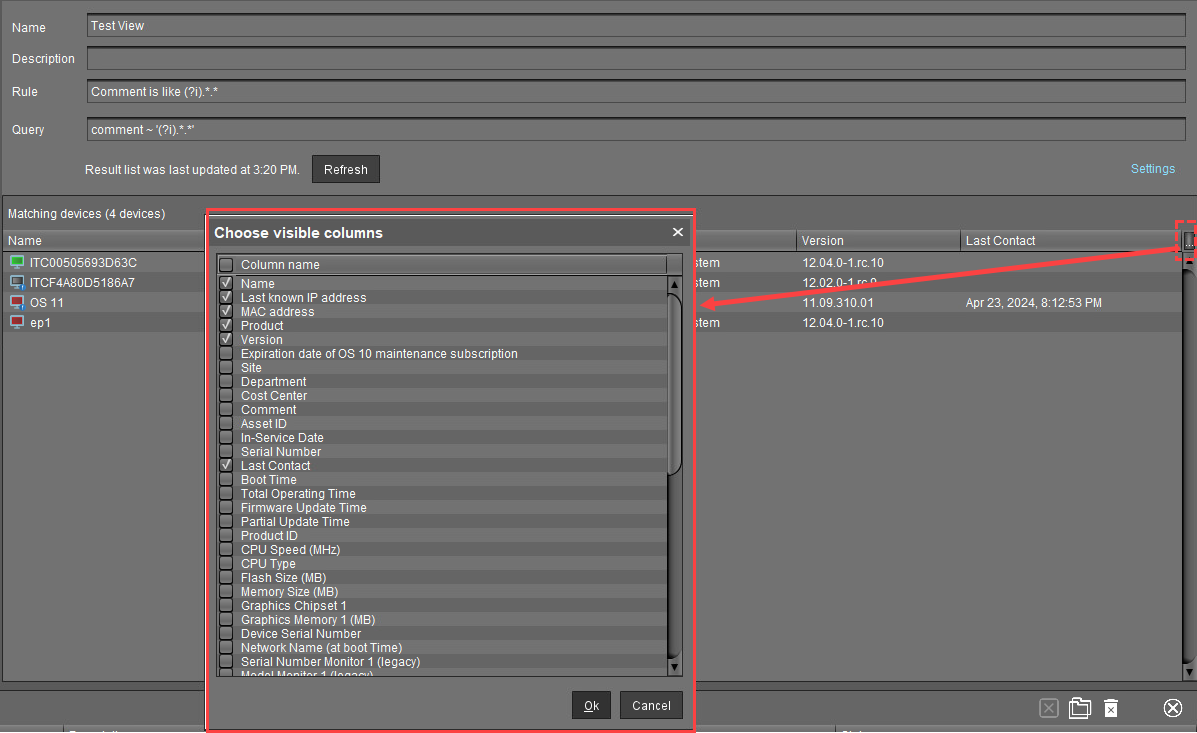
-
Select the columns that are to be displayed.
Related Articles
-
How to Create a New View in the IGEL UMS -
So speichern Sie die Ergebnisliste einer View in der IGEL UMS -
So kopieren Sie ein View-Verzeichnis in der IGEL UMS -
So kopieren Sie eine View in der IGEL UMS -
So senden Sie eine View per E-Mail in der IGEL UMS -
So weisen Sie einer View Objekte in der IGEL UMS zu