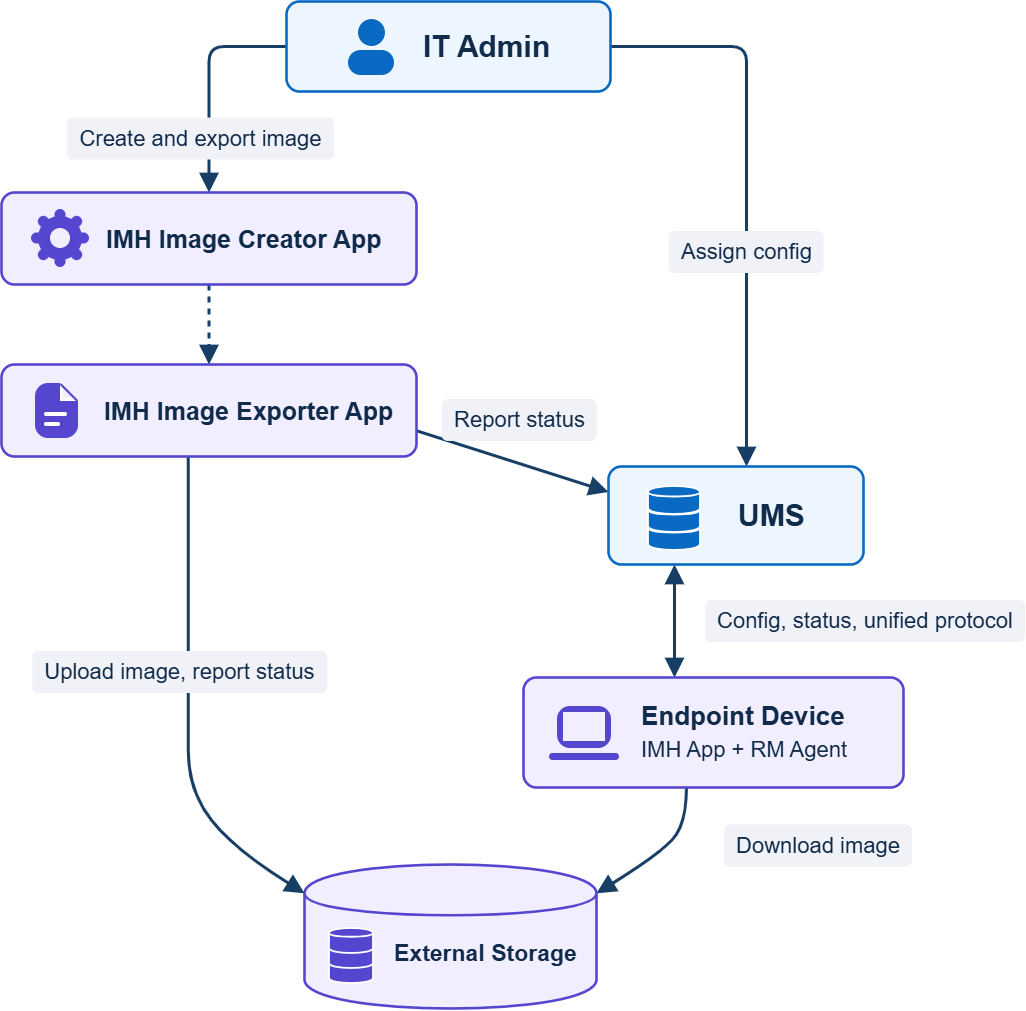
The IGEL Managed Hypervisor (IMH) app allows you to run virtual machines on IGEL OS 12 devices. Using the IGEL Managed Hypervisor, you create your virtual machine from an ISO image or from a VM file and then export the resulting image to a storage server. To distribute the VM images to your fleet of devices and to manage your virtual machines centrally, you use the UMS Web App.
Prerequisites
Hardware
-
CPU
-
64-bit capable
-
Dual-core or more
-
1.5 GHz or more
-
CPU must be virtualization-enabled (Intel VT-x or AMD-V)
-
-
RAM: 8 GB minimum, 16 GB recommended
-
Storage
-
128 GB or more; for virtual machines that run MS Windows 10 or MS Windows 11, the storage requirements may be higher
-
SSDs are strongly recommended
-
-
EFI must be used on the devices; with BIOS, creating and deploying a virtual machine will not be possible
-
If you are installing IMH on a virtual machine, make sure the hardware-assisted virtualization extensions (Intel VT-x or AMD-V) are exposed
Environment / Infrastructure
UMS
-
Your UMS version is 12.15.100 or higher
-
The image creation machine and all target machines are registered in the UMS
-
The app IGEL Managed Hypervisor is registered in the UMS
-
Sizing: Installations with up to 20,000 virtual machines have been tested with a single UMS server. For further information on sizing, see Sizing Guidelines for IGEL UMS 12 and IGEL OS 12.
Image Source
The source from which you want to create the Golden Image is available in one of the following forms:
-
ISO file
-
Existing virtual machine in one of the following source formats:
-
.ova(typically VMware, VirtualBox) -
.vmdk(typically VMware) -
.vdi(typically VirtualBox) -
.vhdx(typically Microsoft Hyper-V) -
.qcow/.qcow2(typically KVM / QEMU / Linux virtualization tools) -
.img(various tools)
-
Storage (Image Inventory)
You have a server or cloud storage in place that supports one of the following protocols:
-
WebDAV via HTTP/HTTPS
-
SFTP
-
SMB / Windows share
IGEL OS Base System
-
IGEL OS Base System 12.10.1 or higher is installed on the image creation machine and all target machines
IGEL Managed Hypervisor
-
For full functionality: IGEL Managed Hypervisor 2.1.0 or higher is installed on the image creation machine and all target machines.
-
Backward compatibility notes:
-
Images and configuration profiles created with earlier versions of IGEL Managed Hypervisor can be used with IGEL Managed Hypervisor 2.1.0 and UMS 12.15.100
-
Images created with IGEL Managed Hypervisor 2.1.0 can not be used on target machines with earlier versions of IGEL Managed Hypervisor
-
Licenses
-
Your UMS has the IGEL Enterprise UMS license; for details, see IGEL OS Editions
-
You have enough IGEL Managed Hypervisor volume-based Licenses for all virtual machines; see IGEL Managed Hypervisor Volume-Based License (IMH 2.0 or Higher).
Supported Operating Systems on Virtual Machines
The following operating systems can be used on virtual machines created and managed by the IGEL Managed Hypervisor:
-
Microsoft Windows XP
-
Microsoft Windows 7
-
Microsoft Windows Embedded Systems (WES) 7
-
Microsoft Windows 10
-
Microsoft Windows 10 IoT Core
-
Microsoft Windows 11
-
Microsoft Windows 11 IoT Core
Workflow
-
On an IGEL OS machine with the IGEL Managed Hypervisor (IMH) app installed, you create a virtual machine. The source can be an ISO image or a virtual machine file, e.g. in
.ovaor.vmdkformat. At this stage, you can edit your virtual machine settings. -
On the same machine, you export an image of your virtual machine and upload it for redistribution.
-
Using the UMS Web App, you distribute the image to the relevant IGEL OS devices.
-
You manage your virtual machines using the UMS Web App. This includes:
-
Starting and stopping virtual machines
-
Backing up and restoring data on virtual machines
-
Monitoring the status of images and virtual machines
-
Retiring virtual machines; when a virtual machine is retired, the assigned license is freed.
-
IGEL Managed Hypervisor Ecosystem