
This article shows how to enable local login to the device via the Kerberos protocol in IGEL OS.
Active Directory/Kerberos must be configured as a prerequisite, see Active Directory/Kerberos Configuration in IGEL OS 12.
Menu path: Security > Logon > Active Directory/Kerberos
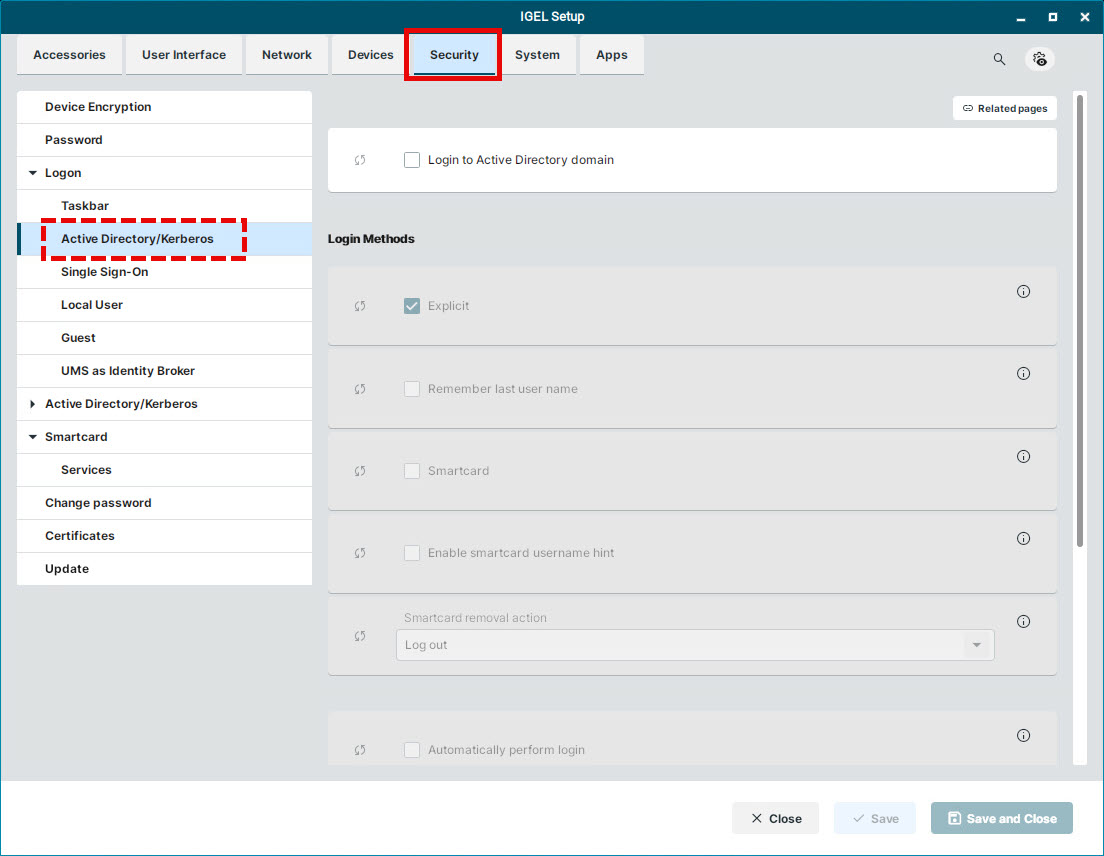
The login can be used for single sign-on in a number of session types (ICA, RDP).
Login to Active Directory domain
☑ You can log in to the device via Active Directory.
☐ You cannot log in to the device via Active Directory. (Default)
Login Methods
You need to enable the Login to Active Directory domain option in order to make changes under Login Methods.
Explicit
☑ You can log in with a user name and password. (Default)
☐ You cannot log in with a user name and password. If logging in with a smartcard is set up, you can log in with a smartcard.
Remember last user name
☑ The login dialog will be pre-populated with the last user name that logged on. Explicit must be enabled for this.
☐ The login dialog will not be pre-populated. (Default)
Smartcard
☑ You can log in using a smartcard.
☐ You cannot log in using a smartcard. (Default)
Enable smartcard username hint
☑ An additional text field is displayed to enter a username hint.
☐ No additional text field for a username hint is displayed. (Default)
Smartcard removal action
Specifies what action is performed when the smartcard via which the user is logged in is removed.
Possible actions:
-
Log out: The user is logged out from the device. (Default)
-
Lock device: The screen is locked.
-
No action: The user can continue the session as regular. In case lock screen starts while the smartcard is removed, the user is prompted to insert the smartcard for the user specified at login. After inserting the correct smartcard, it is possible to unlock the device.
If the login method is configured and the Allow system logoff option is enabled under System > Power Options > Shutdown, the user can log off the device through the shutdown menu. For information on how to access the shutdown menu, see Commands Session in IGEL OS 12. For information on how to configure the shutdown menu, see Shutdown Settings in IGEL OS 12.
Automatically perform login
☑ The device performs the login automatically on startup. The credentials provided in Username for autologin and Password for autologin are used for Microsoft Active Directory (AD).
☐ The login is not performed automatically; a login dialog is displayed.
Username for autologin
The username that is used for automatic login.
Password for autologin
The password that is used for automatic login.