
The IGEL OS 12 device can be configured as a Distributed Peer Update Server (formerly known as Buddy Update Server) to distribute app and base system updates through the network to other IGEL OS 12 devices. You can specify one or several IGEL OS 12 devices to function as a peer update server for other IGEL OS 12 devices.
For more information on how to configure the feature, see How to Configure Distributed Peer Update with IGEL OS 12 Devices.
Menu path: System > Update > Distributed Peer Update Server
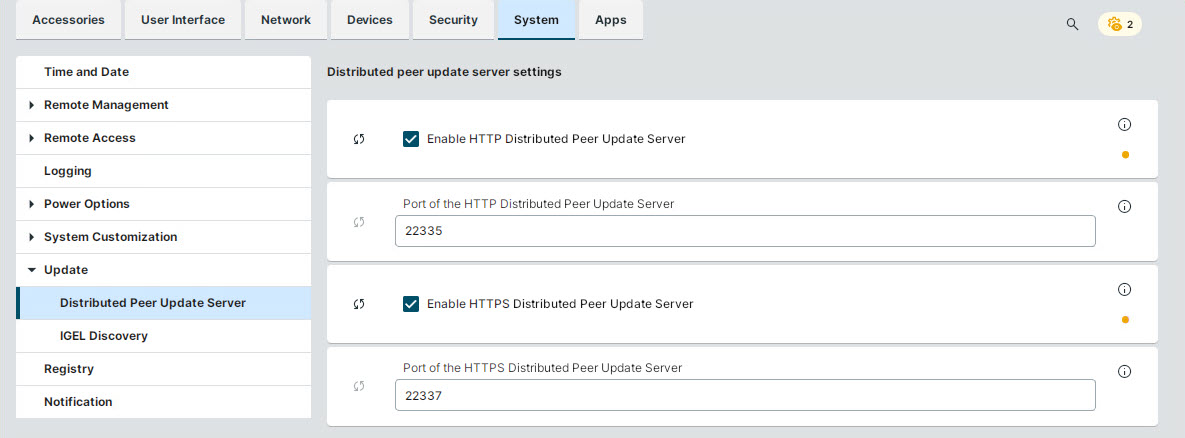
Enable HTTP Distributed Peer Update Server
- The IGEL OS 12 device serves as an HTTP distributed peer update server and can provide app and base system updates for other IGEL OS 12 devices in the network over HTTP. The port to serve as an app repository server is configured below.
- The IGEL OS 12 device does not serve as an HTTP peer update server. (Default)
Port of the HTTP Distributed Peer Update Server
Port on which the HTTP distributed peer update server runs. (Default: 22335)
Enable HTTPS Distributed Peer Update Server
- The IGEL OS 12 device serves as an HTTPS Distributed Peer Update Server and can provide app and base system updates for other IGEL OS 12 devices in the network over HTTPS.
The HTTPS Peer Update Server uses the certificate and private key of the Remote Management Agent. Therefore, the device must be enrolled by UMS. If the certificate or private key is missing, the HTTPS Peer Update Server fails to start.
- The IGEL OS 12 device does not serve as an HTTPS peer update server. (Default)
Port of the HTTPS Distributed Peer Update Server
Port on which the HTTPS Distributed Peer Update Server runs. (Default: 22337)
Maximum number of parallel peer connections when the Peer Update Server is used by IGEL Discovery can be set using the registry key:
update.buddy_server.limit_of_connections
The default value is 1. Updating this setting requires a restart.