
You can control the use of Bluetooth devices on your IGEL OS 12 endpoints. Bluetooth access control helps to prevent unauthorized Bluetooth peripherals from connecting to endpoints, which reduces security risks and ensures compliance with organizational policies.
The main features of Bluetooth access control on IGEL OS 12 include the following:
-
Differentiation between Bluetooth device classes (e.g. audio/video, phone, peripheral/HID, etc.)
-
Blocking all non-approved devices and device classes
-
Whitelisting Bluetooth devices via Manufacturer ID or Service UUID
Menu path: Devices > Bluetooth > Access Control
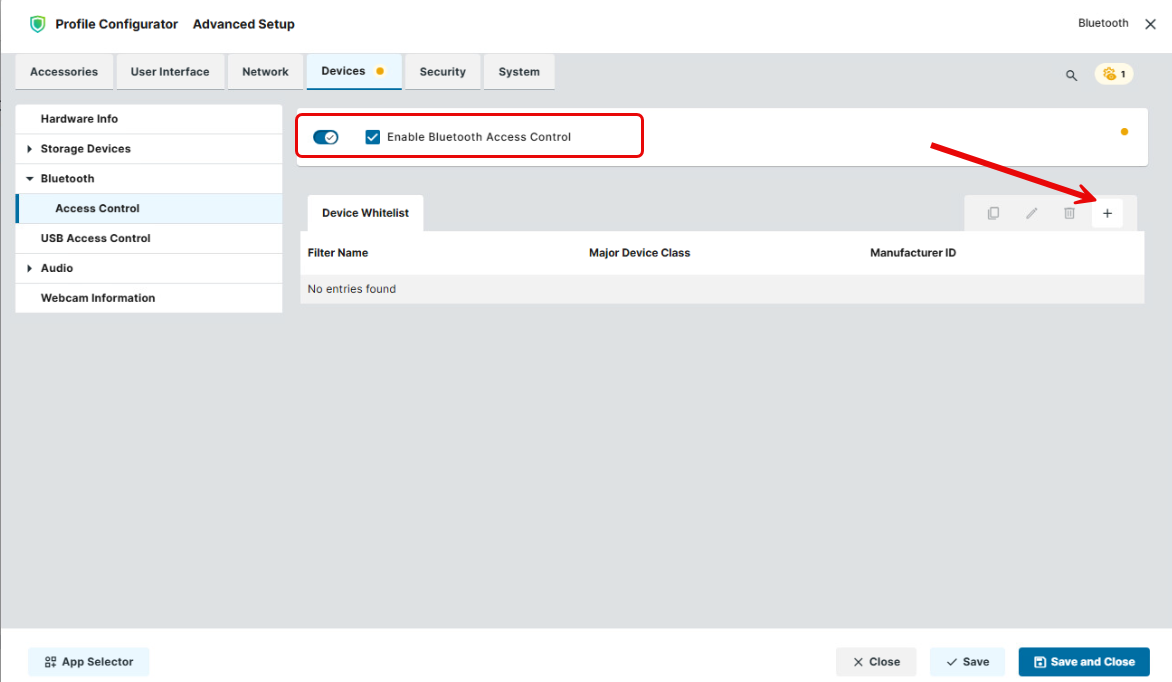
Enable Bluetooth Access Control
- Bluetooth access control is inactive. (Default)
- Bluetooth access control is enabled and you can whitelist specific devices and device classes. All paired or connected devices that do not match the whitelist rules will be disconnected and marked as untrusted.
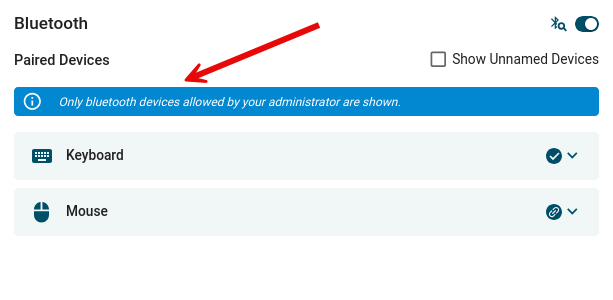
In the Bluetooth Tray App, only whitelisted devices will be listed as available devices. The end user sees the corresponding notification:
Device Whitelist
Bluetooth devices listed here are allowed on the IGEL OS endpoint. The connection of Bluetooth devices not listed here is prohibited.
To manage the whitelist:
-
Click

-
Click

-
Click

-
Click

→ To whitelist a specific Bluetooth device, click the + button and define the following settings:
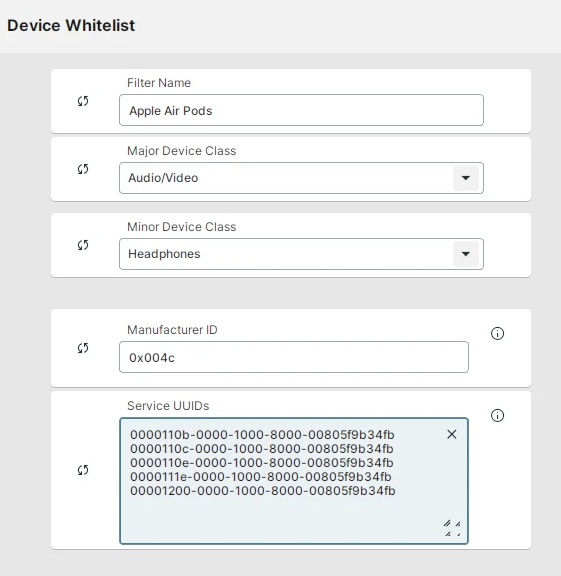
Filter Name
Name of the filtering criterion used to organize your whitelist rules. You can provide any name here.
Major Device Class
Device class that must be whitelisted, e.g. Audio/Video, Peripheral/HID, Health, etc. Depending on your selection, Minor Device Class and Minor Device Sub-Class can be configured.
Manufacturer ID
Manufacturer Identifier of the Bluetooth device in hexadecimal format. Example: 0x004c
Service UUIDs
Universally Unique Identifier (UUID) of the Bluetooth device in 128-bit format. Each UUID must be on a separate line.
Example:
00001000-0000-1000-8000-00805f9b34fb
00001101-0000-1000-8000-00805f9b34fb
00001108-0000-1000-8000-00805f9b34fb
Not all Bluetooth devices include every property listed above. If a device does not have a specific property, it will never pass a whitelist rule that filters by that property.
Example: a device without Major device class property cannot pass a whitelist rule which matches by Major Device Class set to Audio/Video.
The least strict rule will win over a stricter, i.e. more specific, rule.
Example:
A rule that only matches by Major Device Class (e.g. Audio/Video) will lead to all devices that have this property being whitelisted even if there is a stricter rule that matches for this Major Device Class and other properties.
Therefore, it is recommended to include as many properties as possible into each rule, incl. Manufacturer ID and Service UUIDs.
How to Find Out Data for Bluetooth Whitelist Rules via igel-bluetooth-info Script
To find out Manufacturer ID, Service UUIDs, Major Device Class and Minor Device Class of an available Bluetooth device, you can use the script igel-bluetooth-info:
-
Open the Bluetooth Tray App in the IGEL system tray.
-
Switch to the Available Devices view to start device discovery.
Ensure the Bluetooth device is not already paired! Some devices will report a larger amount of Service UUIDs when they are paired vs. when they are only discovered as available.
If you use all UUIDs a device shows when it its paired, it could lead to your filter being too strict and the device not appearing in the list of available devices when the settings are saved and applied.
-
Open a terminal. For more information on terminals, see Terminals in IGEL OS.
-
After the device appears in the list of available devices in the system tray, enter the following command:
/usr/bin/igel-bluetooth-info
Example output after discovering some devices, e.g. Redmi Buds 3 Lite earbuds, an unnamed device, and EF12 wristwatch:
Redmi Buds 3 Lite - E0:08:71:4D:9E:38
-------------------------------------
Class:
    Major: Audio/Video (headset, speaker, stereo, video display, VCR, ...)
    Minor: Headphones
ManufacturerID: N/A
Service UUIDs:
  - Service Discovery Serve.. (00001000-0000-1000-8000-00805f9b34fb)
  - Serial Port               (00001101-0000-1000-8000-00805f9b34fb)
  - Headset                   (00001108-0000-1000-8000-00805f9b34fb)
  - Audio Sink                (0000110b-0000-1000-8000-00805f9b34fb)
  - A/V Remote Control Target (0000110c-0000-1000-8000-00805f9b34fb)
  - A/V Remote Control        (0000110e-0000-1000-8000-00805f9b34fb)
  - A/V Remote Control Cont.. (0000110f-0000-1000-8000-00805f9b34fb)
  - Handsfree                 (0000111e-0000-1000-8000-00805f9b34fb)
  - Headset HS                (00001131-0000-1000-8000-00805f9b34fb)
  - PnP Information           (00001200-0000-1000-8000-00805f9b34fb)
  - Generic Audio             (00001203-0000-1000-8000-00805f9b34fb)
UUIDs for easy copying:
00001000-0000-1000-8000-00805f9b34fb
00001101-0000-1000-8000-00805f9b34fb
00001108-0000-1000-8000-00805f9b34fb
0000110b-0000-1000-8000-00805f9b34fb
0000110c-0000-1000-8000-00805f9b34fb
0000110e-0000-1000-8000-00805f9b34fb
0000110f-0000-1000-8000-00805f9b34fb
0000111e-0000-1000-8000-00805f9b34fb
00001131-0000-1000-8000-00805f9b34fb
00001200-0000-1000-8000-00805f9b34fb
00001203-0000-1000-8000-00805f9b34fb
4A-B5-11-D2-7A-48 - 4A:B5:11:D2:7A:48
-------------------------------------
Class: N/A
ManufacturerID: N/A
Service UUIDs:
  - Device Information (0000180a-0000-1000-8000-00805f9b34fb)
  - Vendor Specific    (5a310100-0000-0000-0000-000000000000)
UUIDs for easy copying:
0000180a-0000-1000-8000-00805f9b34fb
5a310100-0000-0000-0000-000000000000
EF12 - A2:09:11:CC:BA:FF
-------------------------------------
Class:
    Major: Wearable
    Minor: Wristwatch
ManufacturerID: N/A
Service UUIDs: N/A
...