
If you, for example, do not have a free network socket, you can operate your Cherry eHealth Card Terminal ST-1506 via an endpoint in USB RNDIS (Remote Network Driver Interface Specification) mode. In this case, IGEL OS endpoint acts as a NAT router. The card terminal will use the network interface of your IGEL OS device.
For more information on ST-1506, see:
-
CHERRY eHealth Terminal ST-1506 Administrators Manual (German only):
https://cherry.saas.contentserv.com/admin/ImageServer.php?ID=c9d5ca123973@iko249&rand=7fd8bfbaf76d6640e20fb48013ada6fe&lang=1&force=true&download=1 -
CHERRY ST-1506 USB-LAN Proxy User Guide (German only):
https://cherry.saas.contentserv.com/admin/ImageServer.php?ID=fa222a123000@iko249&rand=ecdbe080457ef3f85ef67ef99515bbf2&lang=32&force=true&download=1 -
USB-Modus (RNDIS) Configuration Manual (German only):
https://cherry.saas.contentserv.com/admin/ImageServer.php?ID=b95fba122999@iko249&rand=4184538cb599fac797ec81076c31e366&lang=1&force=true&download=1 -
For further downloads, see:
https://www.cherry.de/service/downloads#15239
Requirements
-
IGEL OS 11.08.100 or higher
-
Cherry ST-1506 must have a static IP configuration
Configuration on Your Cherry ST-1506
-
Connect your card terminal to the IGEL OS device.
-
In the Menu > Admin Menu, enter your admin PIN.
-
Go to Connection > USB Ethernet.
-
Activate RNDIS.
-
Disable DHCP.
-
Configure a static IP address.
-
As Gateway, specify the Host IP address which you configure on your IGEL OS device with the registry key
devices.cherry.terminal%.rndis.host_ipaddress(Default: 192.168.42.1). See the instructions below. -
Save the settings.
Configuration on Your IGEL OS Device
Per each card terminal, one instance of the template devices.cherry.terminal% must be created and configured. By default, none is configured and so the feature is essentially disabled. To add and configure an instance, proceed as follows:
-
In the IGEL Setup or the configuration dialog in the UMS, go to System > Registry > devices > cherry > terminal% and click Add Instance.
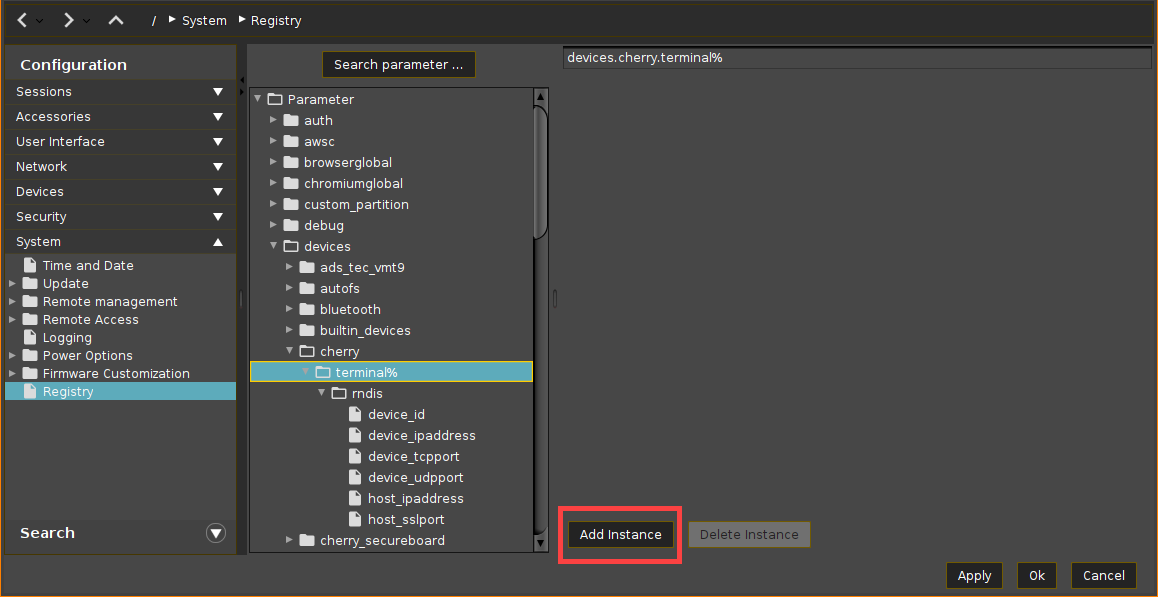
For the added instance, configure the following:
-
For distinguishing purposes if multiple ST-1506 devices are connected, configure the registry key
devices.cherry.terminal%.rndis.device_id. It may be left empty if only one card terminal shall be supported.
Here, you specify:-
a MAC address of the card terminal (To find it out, you can use, for example, the command
ifconfigin the Local Terminals or view it directly on the ST-1506 in the admin menu)
OR -
the value of the udev property
ID_NET_NAME_PATH(To find it out, you can use, for example, the commandudevadm info --export-db| less)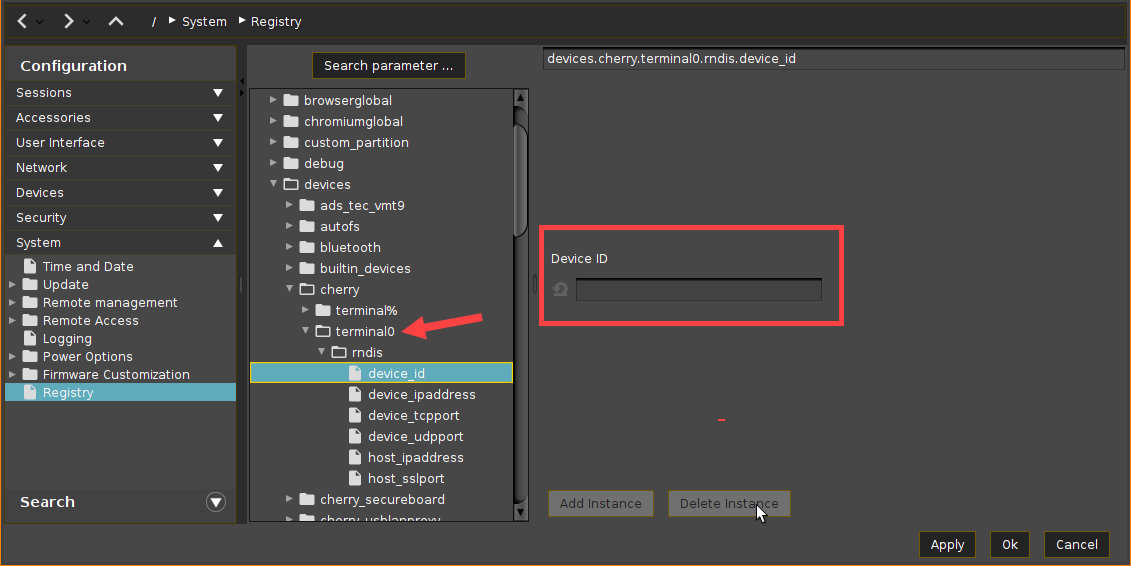
-
-
Configure the Device IP address:
Parameter
Device IP address
Registry
devices.cherry.terminal%.rndis.device_ipaddressType
string
Value
192.168.42.42 (Default)
Note
Here, you specify a static IP you have configured on your ST-1506 via the admin menu.
-
You can leave the default value unchanged if you use it also on your ST-1506.
-
If you have multiple ST-1506 devices connected, you must configure a different IP for each card terminal.
-
-
Configure the Host IP address:
Parameter
Host IP address
Registry
devices.cherry.terminal%.rndis.host_ipaddressType
string
Value
192.168.42.1 (Default)
Note
This is the IP address which you must specify as Gateway on your ST-1506 via the admin menu.
-
If required, configure the following registry keys:
Parameter
Device TCP port
Registry
devices.cherry.terminal%.rndis.device_tcpportType
string
Value
4742 (Default)
Note
This port on the host will be passed through to the same port on the device.
-
If you have multiple ST-1506 devices connected, you must configure a different port for each card terminal.
Parameter
Passed through device UDP port
Registry
devices.cherry.terminal%.rndis.device_udpportType
string
Value
4742 (Default)
Note
This port on the host will be passed through to the same port on the device.
-
If you have multiple ST-1506 devices connected, you must configure a different port for each card terminal.
Parameter
Host SSL port
Registry
devices.cherry.terminal%.rndis.host_sslportType
string
Value
empty (Default)
Note
This port on the host will be forwarded to the device's port 443. Configure this registry key if you are using a web browser for the remote management of your ST-1506 devices.
-
If you have multiple ST-1506 devices connected, you must configure a different port for each added instance.
-