

Amazon WorkSpaces is a cloud-native desktop virtualization, which is built on the AWS Cloud and used to provide Windows or Linux desktops.
Using Amazon WorkSpaces Client, you can configure Amazon WorkSpaces sessions on IGEL OS.
Requirements
-
An existing Amazon WorkSpaces account is required. To set up your account, visit https://aws.amazon.com/workspaces/.
-
Amazon WorkSpaces Client app is imported to your UMS. For details on app import, see How to Import IGEL OS Apps from the IGEL App Portal.
How to Create an Amazon WorkSpaces Client Session
-
In the IGEL UMS, create a profile configuring the Amazon WorkSpaces Client app. For details on profile creation, see How to Create and Assign Profiles in the IGEL UMS Web App.
-
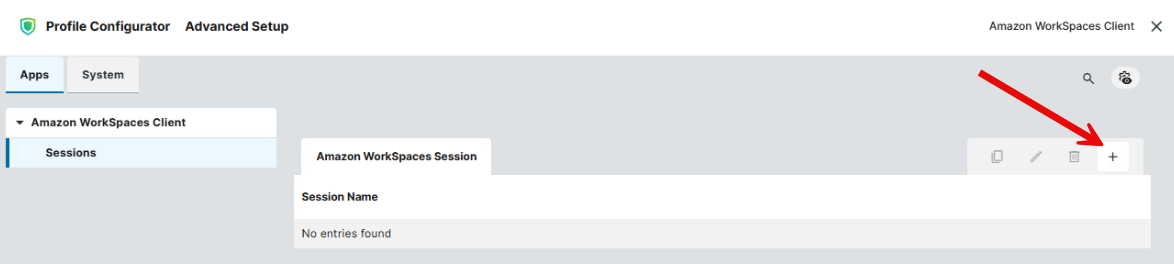
In the Profile Configurator, go to Apps > Amazon WorkSpaces Client > Sessions and click + to create a session:
-
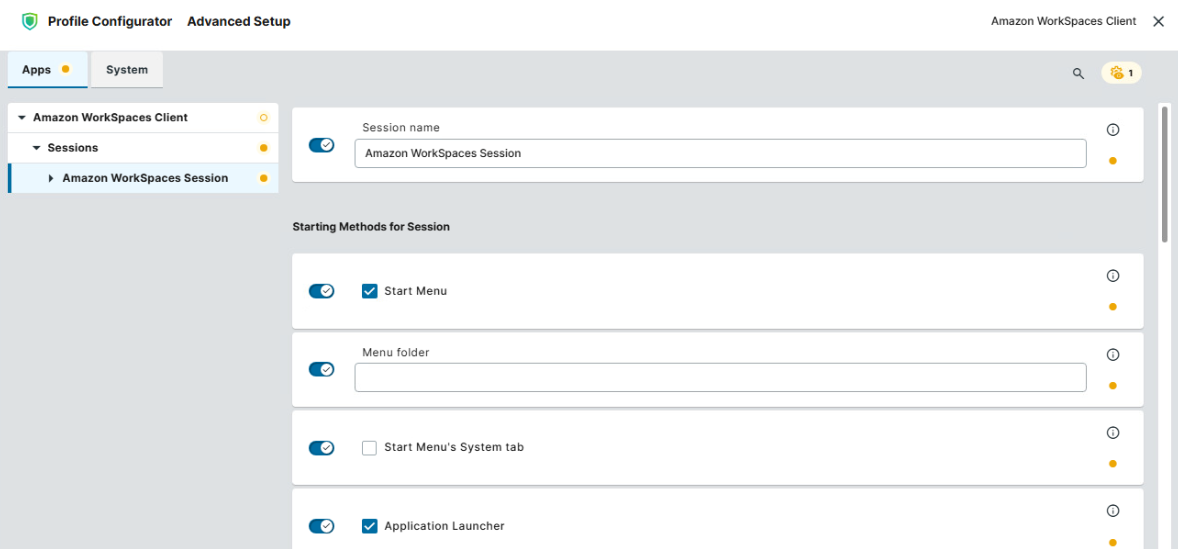
Configure the starting methods for the session. The starting methods parameters are described under Starting Methods for Apps.
-
Configure the settings described below according to your needs.
-
Save the settings and assign the profile to required devices / device directories. For details on profile assignment, see How to Create and Assign Profiles in the IGEL UMS Web App.
Configuring Connection Settings
-
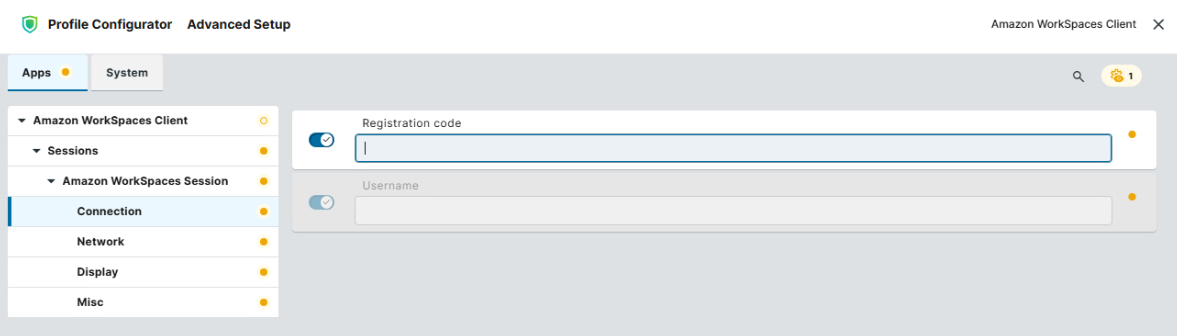
In the Profile Configurator, go to Apps > Amazon WorkSpaces Client > Sessions > [Session Name] > Connection.
-
Edit the settings according to your needs. The parameters are described below.
Registration code
The WorkSpaces registration code which you got from Amazon
Username
Username used to log in to Amazon WorkSpaces
Configuring Network Settings
-
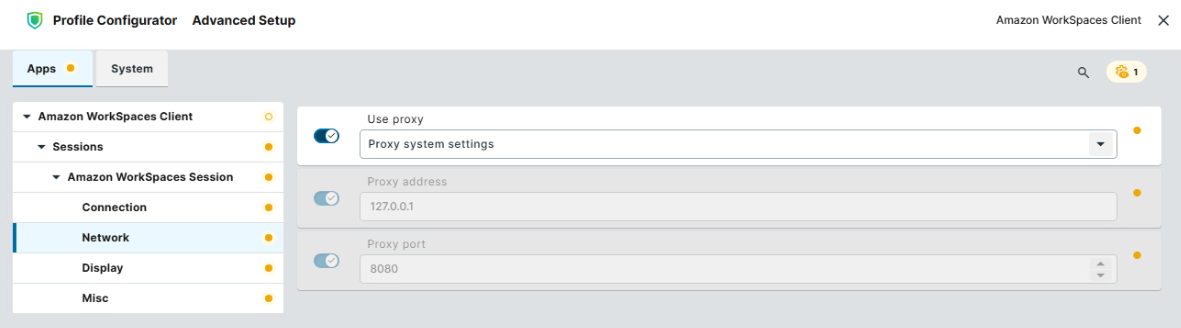
In the Profile Configurator, go to Apps > Amazon WorkSpaces Client > Sessions > [Session Name] > Network.
-
Edit the settings according to your needs. The parameters are described below.
Use proxy
Possible values:
-
No proxy: No proxy is used.
-
Proxy system settings: The proxy configured for the IGEL OS base system under Network > Proxy is used. (Default)
-
Custom proxy settings: The proxy settings configured under Proxy address and Proxy port will be used.
Proxy address
Hostname or IP address of the proxy server. This setting can be configured if Use proxy is set to “Custom proxy settings”.
Proxy port
Port on which the proxy service is available. This setting can be configured if Use proxy is set to “Custom proxy settings”.
Configuring Display Settings
-
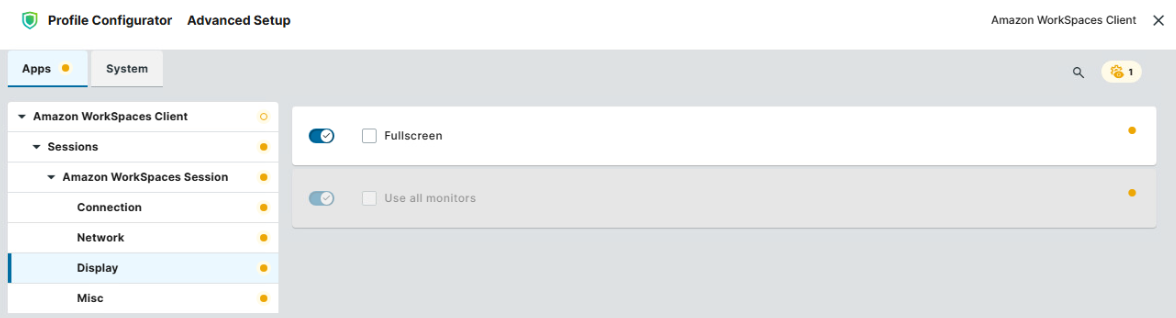
In the Profile Configurator, go to Apps > Amazon WorkSpaces Client > Sessions > [Session Name] > Display.
-
Edit the settings according to your needs. The parameters are described below.
Fullscreen
- The session is displayed in fullscreen mode.
- The session is not displayed in fullscreen mode. (Default)
Use all monitors
- The session in fullscreen mode is expanded over all monitors.
- The session in fullscreen mode is not expanded over all monitors. (Default)
Configuring Miscellaneous Settings
-
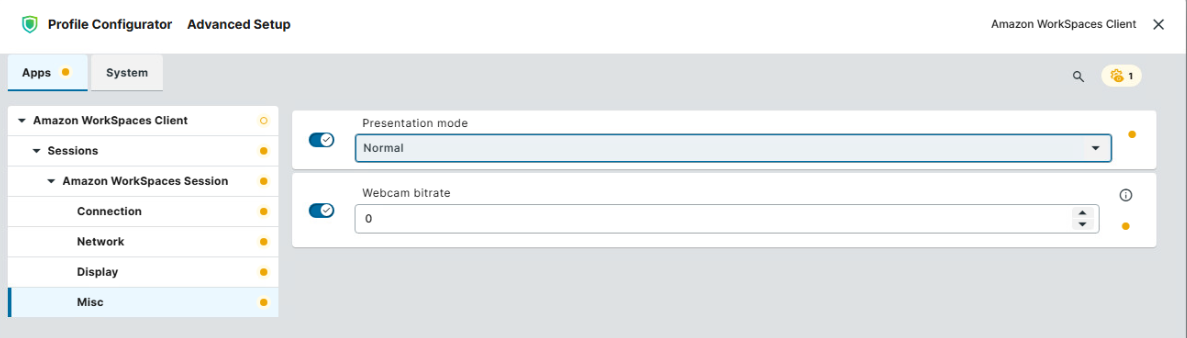
In the Profile Configurator, go to Apps > Amazon WorkSpaces Client > Sessions > [Session Name] > Misc.
-
Edit the settings according to your needs. The parameters are described below.
Presentation mode
Possible values:
-
Normal: The session starts in normal mode. (Default)
-
Kiosk: The session starts in kiosk mode, i.e. the interface is restricted to only what is needed to log into and use Amazon WorkSpaces session. The user cannot access the desktop, settings, or other applications.
Webcam bitrate
Limits the bitrate of a webcam redirected into the Amazon WorkSpaces session. Note that higher webcam bitrate results in sharper, clearer video quality, but increases bandwidth usage. Specify the required webcam bitrate in kilobits per second (kbps). (Default: 0, i.e. no limitation)