

Olympus Virtual Channel redirects button events from supported Olympus and OM SYSTEM dictation devices connected to an IGEL OS endpoint into Citrix or RDP sessions. This allows compatible dictation software in the remote session to respond to controls on microphones, dictation devices, and hand or foot switches.
For information about supported devices, see Olympus and OM SYSTEM Devices Supported by IGEL OS 12.
The article is based on app version 4.0.6-0 BUILD 1.0.
Requirements
-
Olympus Virtual Channel app is imported into your IGEL Universal Management Suite (UMS). For details, see How to Import IGEL OS Apps from the IGEL App Portal.
-
Compatible Olympus / OM SYSTEM component is installed on the server side.
How to Configure Olympus Virtual Channel on IGEL OS
-
In the IGEL UMS, create a profile configuring the app. For details on profile creation, see How to Create and Assign Profiles in the IGEL UMS Web App.
-
In the Profile Configurator, go to Apps > Olympus > Settings.
-
Configure the following settings according to your needs.
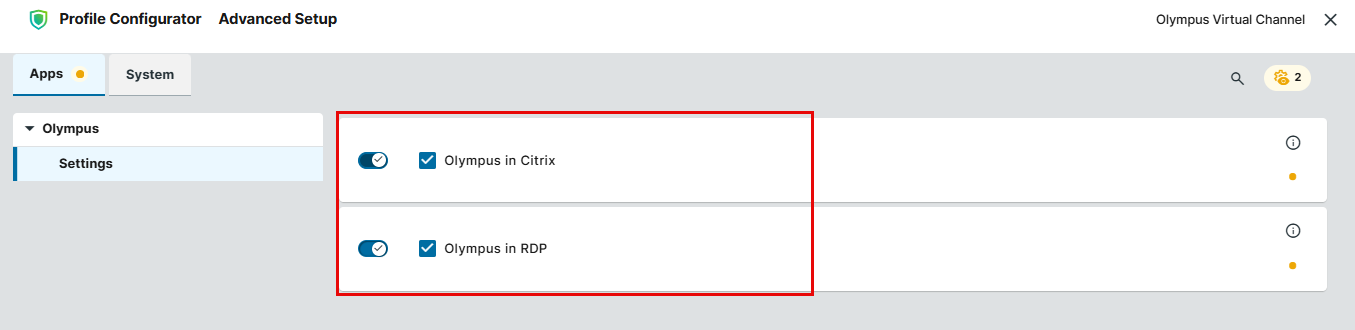
Olympus in Citrix
- A virtual channel for communication with Olympus devices is enabled for Citrix sessions. (Default)
Olympus in RDP
- A virtual channel for communication with Olympus devices is enabled for RDP sessions. (Default)
RDP support requires Olympus Virtual Channel version 4.0.6-0 BUILD 1.0 or higher. Earlier versions support Citrix only.
-
Save the profile and assign it to the required IGEL OS devices. For details on profile assignment, see How to Create and Assign Profiles in the IGEL UMS Web App.